If you have not noticed yet, Embarcadero published the second update for their latest tools: Delphi XE5 as well as RAD Studio XE5 and C++ Builder XE5.
More than one hundred bugs have been fixed. Thanks for the users having taken the time to write a bug report to Quality Central, the web tool used to keep track of bugs and feature requests.
Most fixed bugs are related to the mobile platforms and FireMonkey component set. Obviously the Windows, RTL and VCL parts of the product are very stable.
The update is available freely for registered users of the product.
Download from http://cc.embarcadero.com/item/29662
There is also an article with a partial list of fixes: http://dn.embarcadero.com/article/43522
Update 16/12/2013: Hot fixes are available: HF1 and HF2
Follow me on Twitter
Follow me on LinkedIn
Follow me on Google+
Visit my website: http://www.overbyte.be
This article is available from http://francois-piette.blogspot.be

Showing posts with label IDE. Show all posts
Showing posts with label IDE. Show all posts
December 11, 2013


August 8, 2013
RAD Studio Mobile Roadmap updated
Embarcadero updated his RAD Studio Mobile Roadmap. This concern Delphi and C++ Builder for Android and iOS.
- NDK based Android Platform support (Gingerbread, ICS and Jelly Bean)
- FireMonkey mobile Framework for Android
- Mobile designer for Android
- iOS 7 support
- Mobile sensor support for Android (GPS, Camera, Gyro, Accelerometer)
- Advertizing and payment for Android and iOS
- Native Android UX w/Native UI styles
- iOS 7 UX w/Native UI style
- High performance iOS and Android mobiel DACs for popular databases
- Interbase Lite and IBtoGo for Android support
- Datasnap middleware mobile enterprise enhancements
- Cross Platform desktop/tablet/phone
- Automatic retina/Hi-Res display handling
- Integrated Android Design, development, simulation, debugging and deployment
- Rest client Framework and mobile BaaS support
- Ad Hoc and AppStore deployment
- C++ Builder for Android: estimated winter 2013
Source: http://edn.embarcadero.com/article/42544
Follow me on Twitter
Follow me on LinkedIn
Follow me on Google+
Visit my website: http://www.overbyte.be
What is in development:
- Integrated C++ and Delphi Native ARM toolchains for iOS and Android (compiler, linker, debugger)- NDK based Android Platform support (Gingerbread, ICS and Jelly Bean)
- FireMonkey mobile Framework for Android
- Mobile designer for Android
- iOS 7 support
- Mobile sensor support for Android (GPS, Camera, Gyro, Accelerometer)
- Advertizing and payment for Android and iOS
- Native Android UX w/Native UI styles
- iOS 7 UX w/Native UI style
- High performance iOS and Android mobiel DACs for popular databases
- Interbase Lite and IBtoGo for Android support
- Datasnap middleware mobile enterprise enhancements
- Cross Platform desktop/tablet/phone
- Automatic retina/Hi-Res display handling
- Integrated Android Design, development, simulation, debugging and deployment
- Rest client Framework and mobile BaaS support
- Ad Hoc and AppStore deployment
Roadmap:
- Delphi for Android: estimated fall 2013- C++ Builder for Android: estimated winter 2013
Source: http://edn.embarcadero.com/article/42544
Follow me on Twitter
Follow me on LinkedIn
Follow me on Google+
Visit my website: http://www.overbyte.be
July 8, 2013
Upgrade from ANY version to XE4
Users of ANY earlier version of RAD Studio, Delphi, C++ Builder or Borland Developer Studio can upgrade to XE4.
From now until 31 July 2013. RAD Studio XE4 gives you the tools you need to create multi-device, true native apps for iOS, Windows and Mac.
NEW! Completely new Delphi iOS visual development solution and mobile compiler
NEW! Create apps for PCs, tablets and smartphones from a single codebase
NEW! Access more databases on more devices with FireDAC
NEW! InterBase IBLite embeddable database for iOS with free unlimited distribution
…and much more.
Visit Embarcadero shop
From now until 31 July 2013. RAD Studio XE4 gives you the tools you need to create multi-device, true native apps for iOS, Windows and Mac.
NEW! Completely new Delphi iOS visual development solution and mobile compiler
NEW! Create apps for PCs, tablets and smartphones from a single codebase
NEW! Access more databases on more devices with FireDAC
NEW! InterBase IBLite embeddable database for iOS with free unlimited distribution
…and much more.
Visit Embarcadero shop
April 27, 2013
Enabling floating form designer in Delphi XE4
Delphi XE4 has an interesting feature removed from previous versions: the floating VCL form designer. You can enable it again easily, at your own risk.
While the IDE is not running, launch the registry editor, locate the key HKEY_CURRENT_USER\Software\Embarcadero\BDS\11.0\Form Design and set the "Embedded Designer" to False.
Note: Don't do that if you use FireMonkey. It's form designer doesn't work when floating.
If you need sometimes to have the floating form designer and sometimes not, you way ask the IDE to load his options from another registry key. Use the "-r MyRegKey" in a new shortcut to BDS.EXE. The first time you launch Delphi with that option, the registry key is created with a copy of the current standard key. You can then change the options without affecting the standard registry key. You can also change packages and so on.
 |
| Screen dump of my typical Delphi desktop during development (Dual full HD 24" screen) |
Please share this article as much as possible in the hope Embarcadero will again enable this incredibly useful feature.
This article is available from:
http://francois-piette.blogspot.be/2013/04/enabling-floating-form-designer-in.html
Follow me on Twitter
Follow me on LinkedIn
Follow me on Google+
Visit my website: http://www.overbyte.be
March 5, 2013
Memory leaks detection
The subject of memory leaks detection is frequently invoked and yet, lots of people still wonder how to do it! There are a lot of tools on the market for that purpose. I will talk about the two that I am using:
Using FastMM is very easy. There is no install, just copy the files somewhere on your hard disk. You have to add FastMM4 unit as the first unit under the "uses" section in your project's dpr file. Then you recompile the application.
To take fully advantage of FastMM feature, you should open FastMM4Options.inc file and change some conditional compilation directive. This file is heavily commented to explain all the symbols. When developing your application, you should define the symbols "EnableMemoryLeakReporting" and "FullDebugMode".
Defining FullDebugMode symbol cause code doing extensive checking of all memory blocks to be included in the application. All blocks are padded with both a header and trailer that are used to verify the integrity of the heap. Freed blocks are also cleared to ensure that they cannot be reused after being freed. This option slows down memory operations dramatically and should only be used to debug an application that is overwriting memory or reusing freed pointers. Setting this option automatically enables CheckHeapForCorruption and disables ASMVersion. Very important: If you enable this option your application will require the FastMM_FullDebugMode.dll library.
madExcept is one of the tools in madCollection. It is worth looking for all.
madExcept is free for non-commercial use and not expensive at all for commercial use. Source code is available. See madshi website: http://www.madshi.net/
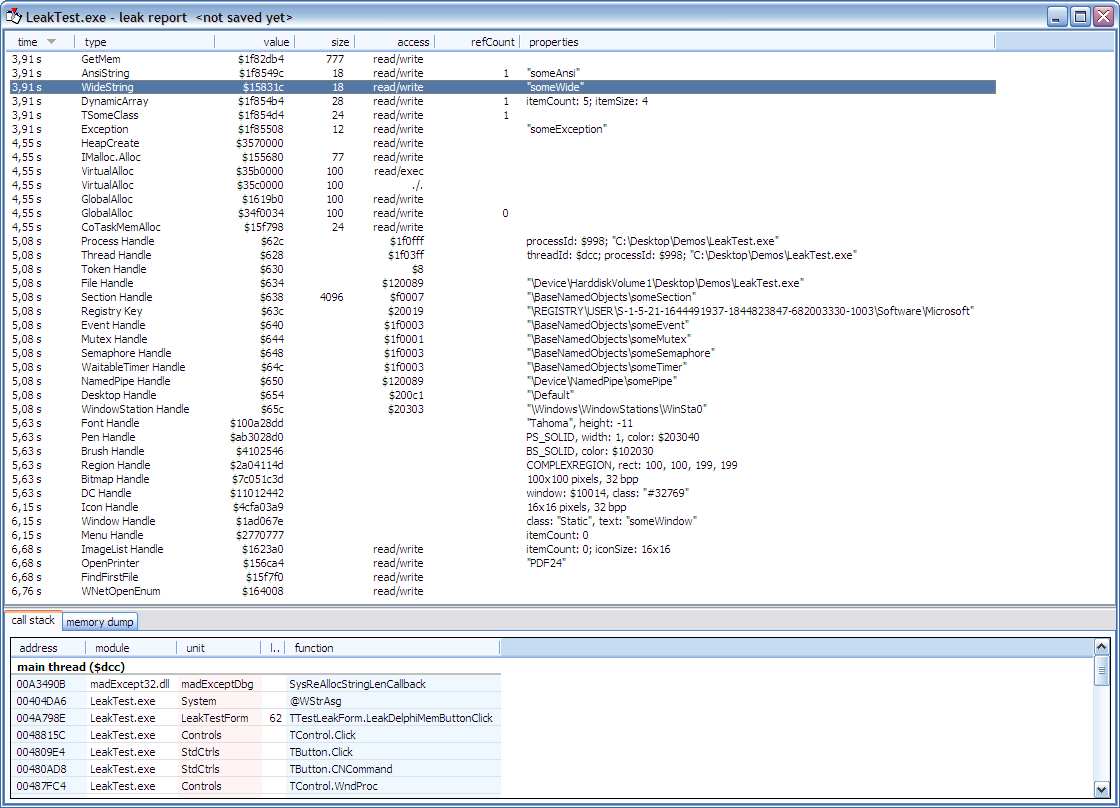
To use madExcept, you have to install it because it include a "wizard" which is show in the IDE project menu. This wizard will configure the tool and add the required units to your project. The first page of the wizard has most interesting options, notably the one to select for reporting the leaks (memory or other resources).
At the end of program execution, you get a report with all links and required information to find the context in which the leak occurred. See this screen dump:

Follow me on Twitter
Follow me on LinkedIn
Follow me on Google+
Visit my website: http://www.overbyte.be
This article is available from http://francois-piette.blogspot.be/2013/03/memory-leaks-detection.html
- FastMM
- madExcept
FastMM
FastMM is actually the memory manager included with Delphi since a few years. It is an original work of Pierre le Riche. Although included with Delphi, you can download full source code from SourceForge at http://fastmm.sourceforge.netUsing FastMM is very easy. There is no install, just copy the files somewhere on your hard disk. You have to add FastMM4 unit as the first unit under the "uses" section in your project's dpr file. Then you recompile the application.
To take fully advantage of FastMM feature, you should open FastMM4Options.inc file and change some conditional compilation directive. This file is heavily commented to explain all the symbols. When developing your application, you should define the symbols "EnableMemoryLeakReporting" and "FullDebugMode".
Defining FullDebugMode symbol cause code doing extensive checking of all memory blocks to be included in the application. All blocks are padded with both a header and trailer that are used to verify the integrity of the heap. Freed blocks are also cleared to ensure that they cannot be reused after being freed. This option slows down memory operations dramatically and should only be used to debug an application that is overwriting memory or reusing freed pointers. Setting this option automatically enables CheckHeapForCorruption and disables ASMVersion. Very important: If you enable this option your application will require the FastMM_FullDebugMode.dll library.
madExcept
madExcept is a tool created by Mathias Rauen. It is an incredibly useful tool, not only for memory leaks, but to help finding the cause of all kind of exceptions.madExcept is one of the tools in madCollection. It is worth looking for all.
madExcept is free for non-commercial use and not expensive at all for commercial use. Source code is available. See madshi website: http://www.madshi.net/
To use madExcept, you have to install it because it include a "wizard" which is show in the IDE project menu. This wizard will configure the tool and add the required units to your project. The first page of the wizard has most interesting options, notably the one to select for reporting the leaks (memory or other resources).
At the end of program execution, you get a report with all links and required information to find the context in which the leak occurred. See this screen dump:
Follow me on Twitter
Follow me on LinkedIn
Follow me on Google+
Visit my website: http://www.overbyte.be
This article is available from http://francois-piette.blogspot.be/2013/03/memory-leaks-detection.html
January 2, 2013
Why I am using Delphi for all my development
Every now
and then, people keep asking me why I use Delphi to develop my software.
Here are a
few reasons:
1. Speed. Delphi is not only a
language, but also an integrated development environment (IDE). Both parts are
blazing fast at their respective tasks.
Language: Being a native language compiler, the
generated code, Intel machine code, is really fast at doing his job.
IDE: I can do everything within the IDE, from
editing, to debugging. I have tools to quickly build applications. There is a
two way form designer and object inspector. As soon as you change a property
value in the object inspector or move/add something visually on a form, your code
reflects it immediately. Developer productivity is excellent.
2. Universality: Delphi can do almost
everything. There is no need to use anything external. Your program is
standalone and do not depends on anything. If you need it, it is easy to call
external software or be called by external software. Delphi supports almost
everything, from low level API to high level database. You can write business
application as well as process control, communication or multimedia
applications. You can build full blown GUI application 2D or 3D, or build web
applications using soap, rest and more.
3. Modern language: although originally
based on Pascal, the Delphi language is now a full blown object oriented
language supporting everything from simple object polymorphism and inheritance to
generic code and run time type information.
4. Rich library: Delphi includes two broad
component frameworks: VCL and FireMonkey. VCL is Windows only while FireMonkey
is cross-platform.
5. Familiar: C/C++/Java/C# and Delphi
are quite similar. They all have the same kind of syntax. Of course some
details vary, but all in all they support the same construct. Among all, I find
I’m the most productive with Delphi.
6. Cross-platform: You can build
applications for Windows, MAC OSx, iOS, 32 and 64 bits. And soon Androïd and
Linux.
7. Active community: Delphi developer
forms a very active community. There is a lot of website devoted to Delphi. All
social networks have each several communities (LinkedIn, Google+, Facebook, Tweeter to point a few) where ideas and code are exchanged.
August 26, 2012
RAD Studio XE3 arrive !
Ca y est, RAD Studio XE3 nous arrive ! L'attente devient insoutenable :-)
Bon d'accord, beaucoup de choses ont déjà filtré. On nous promet de belles choses.
Regardez donc la vidéo de preview
Cette vidéo ne fait qu'égratigner la couche des nouveautés. Il y a plein d'autres choses qu'on ne voit pas. Il est encore un peu tôt pour que je puisse vous en parler, mais cela va venir...
Ceci dit, ce qui m'intéresse particulièrement c'est FireMonkey 2 - alias FM2. Non que je veuille particulièrement faire des applications Windows et les porter sur MAC, mais simplement des application Windows utilisant les possibilités 3D de FM2: En effet, une de mes préoccupations du moment est dans le domaine industriel où je développe des programmes de contrôle de "manipulateur". Ces manipulateurs sont des sortes de robots qui manipulent des pièces pour en faire une inspection RX automatisée. C'est pationnant !
Delphi est un outil merveilleux aussi pour ce genre de programmes.
Je rève donc d'ajouter à mes programmes de contrôle une vue 3D du manipulateur, des pièces et du système RX. Cela apportera à l'utilisateur un réel plus par rapport au 2D d'aujourd'hui. FireMonkey peut faire cela ! Et sans trop de complexité...
Ce qui m'intéresse aussi, c'est la possibilité de faire des applications mobiles, en particulier sur des tabletttes. Mettre à profit mon expérience Delphi Windows me permettra de rapidement produire des application sur ces tablettes.
March 17, 2007
Delphi 2007 est né !
Cette fois ca y est ! Delphi 2007 est prêt chez CodeGear. Le DVD est parti à la fabrication et l'achat avec téléchargement devrait être prêt incessament.
Delphi 2007 est d'emblée disponible en anglais, français, allemand et japonais. J'ai personnellement eu le plaisir de travailler sur la version française.
Delphi 2007 est d'emblée disponible en anglais, français, allemand et japonais. J'ai personnellement eu le plaisir de travailler sur la version française.
March 3, 2007
Delphi 2007, un excellent cru
J'ai reçu la permission de CodeGear de parler de Delphi 2007 et même de le montrer. J'en suis à la fois fort aise et très flatté. Je ne vais donc pas me priver ! Une précaustion cependant: tout ce que je vais vous dire est relatif à la version préliminaire que CodeGear a mise à ma disposition dans le cadre du "Field Test". Il est donc possible que les choses soient un peu différentes dans la version définitive.
Donc voilà... Je travaille avec Delphi 2007 depuis plusieurs mois. J'ai eu l'occasion de tester mes applications et je dois dire que je suis enchanté. Delphi 2007 sera un excellent cru.
Non seulement le produit est très stable, mais il offre une compatibilité totale avec la version précédente BDS2006. Les améliorations ont été apportées avec le soucis de ne pas créer d'incompatibilités. Vous pourrez ainsi reconstruire vos applications D2006 sans y apporter de modification. Plus: vous pourrez même utiliser les modules compilés (les DCU) et les paquets de composants déjà construits (les BPL) prévus pour D2006.
Du côté des améliorations significatives, signalons un nouveau système d'aide, complètement révisé et bien foutu. La présentation est agréable, les liens très nombreux, la table des matières pratique et l'index très complet.
Je voudrais aussi signaler le passage à "MSBuild" qui comme son nom l'indique provient de chez Bill. L'utilisation de ce produit, totalement intégré à l'IDE - apporte quelques plus dont le moindre n'est pas la possibilités davoir des configurations multiples (Typiquement "debug" et "release"). Il y a également la possibilité d'exécuter avant et après construction des commandes de votre choix. Un bonheur pour ceux qui ont des processus de contruction complexes et qui étaient obligé d'abandonner l'IDE pour passer un un "make" traditionnel.
Bon, j'arrête là pour l'instant. Comme on dit, restez connectés et vous en saurez plus :-)
Donc voilà... Je travaille avec Delphi 2007 depuis plusieurs mois. J'ai eu l'occasion de tester mes applications et je dois dire que je suis enchanté. Delphi 2007 sera un excellent cru.
Non seulement le produit est très stable, mais il offre une compatibilité totale avec la version précédente BDS2006. Les améliorations ont été apportées avec le soucis de ne pas créer d'incompatibilités. Vous pourrez ainsi reconstruire vos applications D2006 sans y apporter de modification. Plus: vous pourrez même utiliser les modules compilés (les DCU) et les paquets de composants déjà construits (les BPL) prévus pour D2006.
Du côté des améliorations significatives, signalons un nouveau système d'aide, complètement révisé et bien foutu. La présentation est agréable, les liens très nombreux, la table des matières pratique et l'index très complet.
Je voudrais aussi signaler le passage à "MSBuild" qui comme son nom l'indique provient de chez Bill. L'utilisation de ce produit, totalement intégré à l'IDE - apporte quelques plus dont le moindre n'est pas la possibilités davoir des configurations multiples (Typiquement "debug" et "release"). Il y a également la possibilité d'exécuter avant et après construction des commandes de votre choix. Un bonheur pour ceux qui ont des processus de contruction complexes et qui étaient obligé d'abandonner l'IDE pour passer un un "make" traditionnel.
Bon, j'arrête là pour l'instant. Comme on dit, restez connectés et vous en saurez plus :-)
Subscribe to:
Posts (Atom)