If you have not noticed yet, Embarcadero published the second update for their latest tools: Delphi XE5 as well as RAD Studio XE5 and C++ Builder XE5.
More than one hundred bugs have been fixed. Thanks for the users having taken the time to write a bug report to Quality Central, the web tool used to keep track of bugs and feature requests.
Most fixed bugs are related to the mobile platforms and FireMonkey component set. Obviously the Windows, RTL and VCL parts of the product are very stable.
The update is available freely for registered users of the product.
Download from http://cc.embarcadero.com/item/29662
There is also an article with a partial list of fixes: http://dn.embarcadero.com/article/43522
Update 16/12/2013: Hot fixes are available: HF1 and HF2
Follow me on Twitter
Follow me on LinkedIn
Follow me on Google+
Visit my website: http://www.overbyte.be
This article is available from http://francois-piette.blogspot.be

Showing posts with label RAD. Show all posts
Showing posts with label RAD. Show all posts
December 11, 2013


December 4, 2013
Upgrade your old Delphi version to XE5, any version
Sometimes Embarcadero is promoting his latest Delphi and C++ builder by allowing customer to upgrade from ANY older version. This is just happening now!
I'm really convinced that any Delphi user MUST update to the latest XE5, specially those still using the old D7 and even D5. Migration is not that difficult. Most of the time, well written code just requires a recompile.
Have a look at http://www.embarcadero.com/radoffer
Follow me on Twitter
Follow me on LinkedIn
Follow me on Google+
Visit my website: http://www.overbyte.be
This article is available from http://francois-piette.blogspot.be
I'm really convinced that any Delphi user MUST update to the latest XE5, specially those still using the old D7 and even D5. Migration is not that difficult. Most of the time, well written code just requires a recompile.
Have a look at http://www.embarcadero.com/radoffer
- Upgrade to XE5 from any earlier version (Upgrade price from any previous version)
- Bonus pack with up to $1,150 in free software
- Step Up to Ultimate Edition Free from Enterprise
- Get a free C++Builder iOS upgrade when you buy qualifying C++Builder XE5 or RAD Studio XE5 tools
Follow me on Twitter
Follow me on LinkedIn
Follow me on Google+
Visit my website: http://www.overbyte.be
This article is available from http://francois-piette.blogspot.be
November 24, 2013
OOP design and event driven programming
In a previous article, one of the 3 main design advices was “Use events to free your classes from things that can change”. In this article, I would like to talk a little bit more about it.
Following good OOP practice, you develop by encapsulating almost everything into specialized objects. This makes all the code and all data related to a given subject grouped into a single entity named object.
This encapsulation is quite easy. You first this about what the object is or made of, and what operation can be done on the object or with the object. What the object is or is made of becomes properties. Operations become methods.
Let’s see this in action with a very simple and basic example derived from one of my real world applications. You can skip the following 3 paragraphs if you are not interested by the actual application and only want to read software design part of this article.
First, a little background: As you may know I’m working for a company building – among other things – automated digital radiography (DR) system. A DR system is made of an X ray source, an X ray detector, a diaphragm, a manipulator, a control computer, an image processing system and a database system. It is automated because it does X ray inspection without human interaction. It takes hundreds of radiography fully unattended.
You can see a picture here. OK, when you don’t know what it is, it could be challenging to understand what you see. Actually in the background in orange you see a robotic arm. It holds a fork which support the X ray detector (White rectangular box on the left), the diaphragm (Yellow on the right) and the X ray source (just behind the diaphragm). On the foreground, you see the part being inspected (Component of the low pressure compressor of an aircraft engine). This component is secured on a rotating table you don’t see on the picture.
What my Delphi software does is drive the robot, the rotating table, the X ray source, the diaphragm, and the detector in coordinated movement to take X ray picture of all welds. Pictures are sent to an image processing system for examination and then stored in a database for later search and retrieve.
For such a complex system, it is very important to have a good software design. If you don’t, the application will be horrible to maintain and would probably quickly become unreliable.
Objects are defined at all levels in the application. High level objects making use of low level objects. Each object is specialized for his own purpose. If you don’t carefully think about the purpose, you’ll end up with a single huge object doing everything; or you get a myriad of object doing almost nothing each one. There is no rule to fix the boundaries. Your only guide I can give you is to always think about what the main purpose of the object is and concentrate on it. Everything that doesn’t fit the real purpose must be moved to another object with his own purpose.
Back to our real world example: Both the robot and the rotating table make use of serial communication (RS232 or RS485) between the computer and the electronic and embedded controller driving the motors. They use the same physical communication layer but different protocols. We can immediately see the object candidates, from low level to high level: Basic serial communication, robot communication protocol, rotating table communication protocol, robot itself and rotating table itself.
The basic serial communication will simply drive the computer serial port to send and receive characters. It has no knowledge of what represent the data sent or receive. It only knows how to send data and receive data.
Communication protocol object handle messages required to instruct a robot controller or a rotating table motor controller to do what it needs to. This object doesn’t know how to send characters to a serial port. It even doesn’t know it is making use of a serial port. But it knows how to format a message instructing the robot or the table to reach a given position. The communication protocol object has no idea what is the movement purpose, but it know how to request such movement.
Robot or rotating table objects are high level objects. They know what a robot or table is able to do, they know which sequences of instructions are required for everything a robot or table can do, at least from a low level point of view. The error to be avoided here is to put in that object something related to yet a higher level. That higher level is related to the coordination between the robot and the table, or related to the whole systems.
I have just scratched the surface of the OOP design for such an application. I don’t want to teach you how to build software for automated digital radiography system. I want to teach you how to write good Delphi code (Well, this applies to almost all object oriented programming language).
An object in the middle of a hierarchy receive order from the higher level and has to delegate work to the lower level objects. Those are simple method calls. For example, the robot having to move the arm to a given X, Y, Z position is space (You also need the 3 angles to fully define a position in space) will call a bunch of methods of the communication protocols, probably a message to send each parameter (coordinates and angles) to the robot controller. The communication protocol object will build messages, adding addresses, message number, checksum or CRC and similar items required to make a valid message. It will delegate the sending of the message to the lowest level object handling serial port communication. This object doesn’t know what the messages are but knows how to send it one byte or character at a time, with proper baud rate, parity, start and stop bit, and how to handle handshaking.
So far so good: we only used simple method calls up to now. We are now at the point where we need even driven programming!
The software is driving hardware. Moving a robot arm or rotating a table takes a huge time compared to the computer processing speed. What happens when the requested movement is done or when something went wrong? There is a data flow in the reverse direction! The hardware (Motor controller) sends a message thru the serial port to say – for example – the position has been reached.
The lowest level object receives bytes from the motor controller. After checking errors such as parity, it transmits those bytes to the communication protocol object which assembles complete messages. Messages are checked for validity (format, length, CRC, and so on). Complete messages are then used to notify the robot object or table object that the requested movement is done. It is likely that a single movement is part of a group of coordinated movement. The robot object knows about this coordination and collects all messages until the group is finished and only then forwards the information to the upper layer.
In an event driven software, the backward information flow is handled by events. This means that the software send a request for something and don’t care waiting until the requested operation is done. Rather, it handles notification when something happens, for example the end of requested operation or an error message. This event driven operation is frequently called asynchronous operation because requesting something is decoupled from waiting for it to be done.
Traditional programming, also known as synchronous programming or blocking programming, works by sending a request and waiting for the answer. This is simple and easy. Well easy until you have to do several things simultaneously. With synchronous programming you must then use multithreading to do several thing simultaneously. This works well but it is difficult to develop, debug and maintain. There are a lot of issues arising from thread synchronization. This is a very difficult matter.
Asynchronous programming or event driven programming solves those issues easily. There is no problem at all doing several things simultaneously since “things” are merely requests to do something. The request is almost instantaneous. There is no wait, no blocking. The program never wait that something is done. It just does the processing when it is done.
Think about Windows user interface. Your code never wait that the user clicks on a button. You just assign code to the event which is triggered when the user clicks on the button. The code is executed when the user clicks and you have nothing to do for that to happen.
This event driven behavior can be built into your own objects very easily. It fits very well along to the code you write for the user interface.
Here are the required steps:
Step 1:
We need an integer.
Step 2:
Step3:
Step 4:
Step 5:
Step 6:
Usually I use a single source file for each individual object.
The complete code should looks like this:
Carefully study how I named the various parts. Naming convention is very important to have readable and maintainable code. Keep naming same thing with same name, using prefixes or suffixes to make a distinction where required.
My event is supposed to return a position. Assuming we have several possible positions, I named everything related to the event “XPosition”. The data type is named “TPositionEvent” because the same event will apply to X, Y, Z and all others so the “X” has been dropped. It is to be used for an event so the suffix is “Event”. And it begins with letter “T” because it is a data type.
The property itself is named “OnXPosition” for obvious reasons. Think about the “OnClick” event of a TButton. This is similar.
The member variable has the same name as the property with an “F” prefix. This convention is almost always used.
The trigger procedure begins with prefix “Trigger” and become TriggerXPosition. When the object needs to trigger the OnXPosition event, it will call TriggerXPosition, passing the new position. The procedure is made virtual so that derived classes have a chance to override his behavior. For example, the derived class could enhance it be triggering another event when the value exceed some limit.
The unit containing the code has been named “RobotCommProtocol” because our object handles a communication protocol for a given robot. The object itself is named “TRobotProtocol” for obvious reasons. It derives from TComponent which makes possible to install the object as a component available in Delphi IDE component palette. There are other requirements which are out of this article scope.
There is much more to say about the topic. Please post a comment to the article to ask for the topics I should develop in the next article.
Follow me on Twitter
Follow me on LinkedIn
Follow me on Google+
Visit my website: http://www.overbyte.be
This article is available from http://francois-piette.blogspot.be
Following good OOP practice, you develop by encapsulating almost everything into specialized objects. This makes all the code and all data related to a given subject grouped into a single entity named object.
This encapsulation is quite easy. You first this about what the object is or made of, and what operation can be done on the object or with the object. What the object is or is made of becomes properties. Operations become methods.
Let’s see this in action with a very simple and basic example derived from one of my real world applications. You can skip the following 3 paragraphs if you are not interested by the actual application and only want to read software design part of this article.
First, a little background: As you may know I’m working for a company building – among other things – automated digital radiography (DR) system. A DR system is made of an X ray source, an X ray detector, a diaphragm, a manipulator, a control computer, an image processing system and a database system. It is automated because it does X ray inspection without human interaction. It takes hundreds of radiography fully unattended.
You can see a picture here. OK, when you don’t know what it is, it could be challenging to understand what you see. Actually in the background in orange you see a robotic arm. It holds a fork which support the X ray detector (White rectangular box on the left), the diaphragm (Yellow on the right) and the X ray source (just behind the diaphragm). On the foreground, you see the part being inspected (Component of the low pressure compressor of an aircraft engine). This component is secured on a rotating table you don’t see on the picture.
What my Delphi software does is drive the robot, the rotating table, the X ray source, the diaphragm, and the detector in coordinated movement to take X ray picture of all welds. Pictures are sent to an image processing system for examination and then stored in a database for later search and retrieve.
For such a complex system, it is very important to have a good software design. If you don’t, the application will be horrible to maintain and would probably quickly become unreliable.
Objects are defined at all levels in the application. High level objects making use of low level objects. Each object is specialized for his own purpose. If you don’t carefully think about the purpose, you’ll end up with a single huge object doing everything; or you get a myriad of object doing almost nothing each one. There is no rule to fix the boundaries. Your only guide I can give you is to always think about what the main purpose of the object is and concentrate on it. Everything that doesn’t fit the real purpose must be moved to another object with his own purpose.
Back to our real world example: Both the robot and the rotating table make use of serial communication (RS232 or RS485) between the computer and the electronic and embedded controller driving the motors. They use the same physical communication layer but different protocols. We can immediately see the object candidates, from low level to high level: Basic serial communication, robot communication protocol, rotating table communication protocol, robot itself and rotating table itself.
The basic serial communication will simply drive the computer serial port to send and receive characters. It has no knowledge of what represent the data sent or receive. It only knows how to send data and receive data.
Communication protocol object handle messages required to instruct a robot controller or a rotating table motor controller to do what it needs to. This object doesn’t know how to send characters to a serial port. It even doesn’t know it is making use of a serial port. But it knows how to format a message instructing the robot or the table to reach a given position. The communication protocol object has no idea what is the movement purpose, but it know how to request such movement.
Robot or rotating table objects are high level objects. They know what a robot or table is able to do, they know which sequences of instructions are required for everything a robot or table can do, at least from a low level point of view. The error to be avoided here is to put in that object something related to yet a higher level. That higher level is related to the coordination between the robot and the table, or related to the whole systems.
I have just scratched the surface of the OOP design for such an application. I don’t want to teach you how to build software for automated digital radiography system. I want to teach you how to write good Delphi code (Well, this applies to almost all object oriented programming language).
An object in the middle of a hierarchy receive order from the higher level and has to delegate work to the lower level objects. Those are simple method calls. For example, the robot having to move the arm to a given X, Y, Z position is space (You also need the 3 angles to fully define a position in space) will call a bunch of methods of the communication protocols, probably a message to send each parameter (coordinates and angles) to the robot controller. The communication protocol object will build messages, adding addresses, message number, checksum or CRC and similar items required to make a valid message. It will delegate the sending of the message to the lowest level object handling serial port communication. This object doesn’t know what the messages are but knows how to send it one byte or character at a time, with proper baud rate, parity, start and stop bit, and how to handle handshaking.
So far so good: we only used simple method calls up to now. We are now at the point where we need even driven programming!
The software is driving hardware. Moving a robot arm or rotating a table takes a huge time compared to the computer processing speed. What happens when the requested movement is done or when something went wrong? There is a data flow in the reverse direction! The hardware (Motor controller) sends a message thru the serial port to say – for example – the position has been reached.
The lowest level object receives bytes from the motor controller. After checking errors such as parity, it transmits those bytes to the communication protocol object which assembles complete messages. Messages are checked for validity (format, length, CRC, and so on). Complete messages are then used to notify the robot object or table object that the requested movement is done. It is likely that a single movement is part of a group of coordinated movement. The robot object knows about this coordination and collects all messages until the group is finished and only then forwards the information to the upper layer.
In an event driven software, the backward information flow is handled by events. This means that the software send a request for something and don’t care waiting until the requested operation is done. Rather, it handles notification when something happens, for example the end of requested operation or an error message. This event driven operation is frequently called asynchronous operation because requesting something is decoupled from waiting for it to be done.
Traditional programming, also known as synchronous programming or blocking programming, works by sending a request and waiting for the answer. This is simple and easy. Well easy until you have to do several things simultaneously. With synchronous programming you must then use multithreading to do several thing simultaneously. This works well but it is difficult to develop, debug and maintain. There are a lot of issues arising from thread synchronization. This is a very difficult matter.
Asynchronous programming or event driven programming solves those issues easily. There is no problem at all doing several things simultaneously since “things” are merely requests to do something. The request is almost instantaneous. There is no wait, no blocking. The program never wait that something is done. It just does the processing when it is done.
Think about Windows user interface. Your code never wait that the user clicks on a button. You just assign code to the event which is triggered when the user clicks on the button. The code is executed when the user clicks and you have nothing to do for that to happen.
This event driven behavior can be built into your own objects very easily. It fits very well along to the code you write for the user interface.
Here are the required steps:
- Think about which data you need to pass when the event is triggered
- Create a data type corresponding to the data found in step 1. Add a “Sender” argument. This data type is a pointer to a procedure of object.
- Create a protected member variable in your class to hold the data type from step 2. Usually this member variable name begins with “FOn”.
- Create a published property corresponding to the member variable.
- Create a protected “Trigger” virtual procedure.
- Implement the trigger procedure
Step 1:
We need an integer.
Step 2:
type
  TPositionEvent = procedure (Sender : TObject; Position : Integer) of object;
Step3:
protected
  FOnXPosition : TPositionEvent;
Step 4:
  published
    property OnXPosition : TPositionEvent read  FOnXPosition
                                          write FOnXPosition;
Step 5:
protected
    procedure TriggerXPosition(Position : Integer); virtual;
Step 6:
procedure TMyObject.TriggerXPosition(Position: Integer);
begin
    if Assigned(FOnXPosition) then
        FOnXPosition(Self, Position);
end;
Usually I use a single source file for each individual object.
The complete code should looks like this:
unit RobotCommProtocol;

interface

uses
  Classes;

type
  TPositionEvent = procedure (Sender : TObject; Position : Integer) of object;

  TRobotProtocol = class(TComponent)
  protected
    FOnXPosition : TPositionEvent;
    procedure TriggerXPosition(Position : Integer); virtual;
  published
    property OnXPosition : TPositionEvent read  FOnXPosition
                                          write FOnXPosition;
  end;


implementation

procedure TRobotProtocol.TriggerXPosition(Position: Integer);
begin
    if Assigned(FOnXPosition) then
        FOnXPosition(Self, Position);
end;

end.
Carefully study how I named the various parts. Naming convention is very important to have readable and maintainable code. Keep naming same thing with same name, using prefixes or suffixes to make a distinction where required.
My event is supposed to return a position. Assuming we have several possible positions, I named everything related to the event “XPosition”. The data type is named “TPositionEvent” because the same event will apply to X, Y, Z and all others so the “X” has been dropped. It is to be used for an event so the suffix is “Event”. And it begins with letter “T” because it is a data type.
The property itself is named “OnXPosition” for obvious reasons. Think about the “OnClick” event of a TButton. This is similar.
The member variable has the same name as the property with an “F” prefix. This convention is almost always used.
The trigger procedure begins with prefix “Trigger” and become TriggerXPosition. When the object needs to trigger the OnXPosition event, it will call TriggerXPosition, passing the new position. The procedure is made virtual so that derived classes have a chance to override his behavior. For example, the derived class could enhance it be triggering another event when the value exceed some limit.
The unit containing the code has been named “RobotCommProtocol” because our object handles a communication protocol for a given robot. The object itself is named “TRobotProtocol” for obvious reasons. It derives from TComponent which makes possible to install the object as a component available in Delphi IDE component palette. There are other requirements which are out of this article scope.
There is much more to say about the topic. Please post a comment to the article to ask for the topics I should develop in the next article.
Follow me on Twitter
Follow me on LinkedIn
Follow me on Google+
Visit my website: http://www.overbyte.be
This article is available from http://francois-piette.blogspot.be
November 10, 2013
Delphi uses Excel to create a chart in a PDF document
Microsoft Excel exposes all his features thru a COM interface which can easily be used from a Delphi application. In this article, I use that feature to create a 3D pie chart from data available within a Delphi program and produce a PDF document.
I already talked about using Microsoft Office applications in this article. I gave examples using Word. In this article I use Excel for what it does very well: take an array of data and produce a nice chart.
Excel exposes a number of objects and this makes programming it a little bit confusing at first. The three most important objects are:
There are a lot of other objects or object collections. In this article we will use “Cells” and “Charts”. They are exactly what their names imply.
Each object or collection has a lot of properties and methods. This is where it becomes quite complex. Although most names are explicit, their use isn’t. Microsoft publishes a lot of documentation (http://msdn.microsoft.com/en-us/library/office/bb726434(v=office.12).aspx). Of course none of this documentation is written using Delphi syntax. Nevertheless it is of great help even if most samples are VBA or C#.
There are a large number of Office versions. The programming interface change slightly between each version but all in all, upward compatibility is excellent. The gold rule is to always use the oldest API version suitable for what you need to do. Because of upward compatibility, your application will generally work for the version you selected and all more recent versions.
For my sample application, I used Excel 2010. Microsoft reference is here.
In Delphi, you must use the correct components. See discussion in this article. What I said then for XE4 is valid for XE5 as well as previous versions.
My demo application is simple: A single VCL form with a single button. The button’s OnClick handler connect to excel, create a workbook having a worksheet, fill cells with simple data, create a new chart with the data, export the chart as a PDF file, close the workbook and Excel.
I hardcoded the data to keep the code simple. It is quite trivial to fetch data from anywhere, including some database. How the data is fetched is not today’s article object.
There are a number of traps when writing this kind of application. Most Office API functions have a lot of arguments. Most of them can be left empty. When you specify some argument the code may triggers an access violation or an OLE error. For example, when adding a chart, on argument specifies the chart type. I’ve found that using it will trigger an OLE error. I had to left it empty and then change the property ChartType to actually change the type of chart. This is really annoying because error messages are not explicit at all! It is a try and error play. It is time consuming.
The resulting code is very short and simple indeed:
Follow me on Twitter
Follow me on LinkedIn
Follow me on Google+
Visit my website: http://www.overbyte.be
This article is available from http://francois-piette.blogspot.be
I already talked about using Microsoft Office applications in this article. I gave examples using Word. In this article I use Excel for what it does very well: take an array of data and produce a nice chart.
Excel exposes a number of objects and this makes programming it a little bit confusing at first. The three most important objects are:
- ExcelApplication: this is the whole Excel application.
- WorkBook: This is a spreadsheet file
- WorkSheet: This is a page within a workbook.
There are a lot of other objects or object collections. In this article we will use “Cells” and “Charts”. They are exactly what their names imply.
Each object or collection has a lot of properties and methods. This is where it becomes quite complex. Although most names are explicit, their use isn’t. Microsoft publishes a lot of documentation (http://msdn.microsoft.com/en-us/library/office/bb726434(v=office.12).aspx). Of course none of this documentation is written using Delphi syntax. Nevertheless it is of great help even if most samples are VBA or C#.
There are a large number of Office versions. The programming interface change slightly between each version but all in all, upward compatibility is excellent. The gold rule is to always use the oldest API version suitable for what you need to do. Because of upward compatibility, your application will generally work for the version you selected and all more recent versions.
For my sample application, I used Excel 2010. Microsoft reference is here.
In Delphi, you must use the correct components. See discussion in this article. What I said then for XE4 is valid for XE5 as well as previous versions.
My demo application is simple: A single VCL form with a single button. The button’s OnClick handler connect to excel, create a workbook having a worksheet, fill cells with simple data, create a new chart with the data, export the chart as a PDF file, close the workbook and Excel.
I hardcoded the data to keep the code simple. It is quite trivial to fetch data from anywhere, including some database. How the data is fetched is not today’s article object.
There are a number of traps when writing this kind of application. Most Office API functions have a lot of arguments. Most of them can be left empty. When you specify some argument the code may triggers an access violation or an OLE error. For example, when adding a chart, on argument specifies the chart type. I’ve found that using it will trigger an OLE error. I had to left it empty and then change the property ChartType to actually change the type of chart. This is really annoying because error messages are not explicit at all! It is a try and error play. It is time consuming.
The resulting code is very short and simple indeed:
procedure TForm1.Button1Click(Sender: TObject);
var
    WBook  : ExcelWorkbook;
    WSheet : ExcelWorksheet;
    Row    : Integer;
    WChart : ExcelChart;
    LCID   : Integer;
begin
    // Get the locale identifier for the user default locale
    LCID := GetUserDefaultLCID;
    //Connect to Excel application, this will launch excel
    ExcelApplication1.Connect;
    // Make excel visible (This is not required)
    ExcelApplication1.Visible[LCID] := TRUE;
    // Create a new workbook with a new sheet
    WBook  := ExcelApplication1.Workbooks.Add(xlWBATWorksheet, LCID);
    WSheet := WBook.ActiveSheet as ExcelWorksheet;
    // Add some data to the sheet
    WSheet.Cells.Item[1, 1] := 'Item';
    WSheet.Cells.Item[1, 2] := 'Quantity';
    for Row := 0 to High(Data) do begin
        WSheet.Cells.Item[2 + Row, 1] := Data[Row].Item;
        WSheet.Cells.Item[2 + Row, 2] := Data[Row].Quantity;
    end;
    // Create a new chart
    WChart := WBook.Charts.Add(EmptyParam, EmptyParam,
                               EmptyParam, EmptyParam, LCID) as ExcelChart;
    // Set the chart type
    WChart.ChartType := xl3DPie;
    // Set the tab name
    WChart.Location(xlLocationAsNewSheet, 'MyChart');
    // Export the chart as a PDF file
    WChart.ExportAsFixedFormat(xlTypePDF, 'MyChart.pdf', xlQualityStandard,
                               TRUE, FALSE, EmptyParam, EmptyParam,
                               TRUE,         // Open after published
                               EmptyParam);
    // Close the workbook, quit excel and disconnect
    WBook.Close(FALSE, EmptyParam, EmptyParam, LCID);
    ExcelApplication1.Quit;
    ExcelApplication1.Disconnect;
end;
--
Follow me on Twitter
Follow me on LinkedIn
Follow me on Google+
Visit my website: http://www.overbyte.be
This article is available from http://francois-piette.blogspot.be
August 20, 2013
Delphi XE5 to develop Android applications
Delphi XE5 is about to be announced. I have the chance to use a preview version for several weeks now. I’m very impressed!
Using Delphi XE5 I was able to write my first Android application and deploy it to my Nexus 7 in a couple of minutes. OK, for now it is a very basic application: I just took one of the predefined application templates, added a few buttons and labels, hit F9. After a few seconds, the application was compiled and deployed on my Nexus 7 connected to my PC with an USB cable. The application was up and running and I was able to debug it. Waouw!
As you know, I the author of the Internet Component Suite (aka ICS). ICS is about internet programming according to the asynchronous non-blocking programming model. I already started porting my code to Android.
Delphi XE5 is a native compiler for Android. It means Delphi XE5 compile into ARM machine language. It is neither Java nor running under a Java Virtual Machine (Renamed Dalvik on Android). No, Delphi XE5 produces native code which runs fast.
This will help me porting ICS to Android because Delphi XE5 gives me access to the underlying operating system which is… Linux! ICS is all about low level programming and I’m very happy about how it is done in XE5.
Of course XE5 comes with the famous FireMonkey framework (FMX) which covers a lot of thing. The most noticeable is the user interface. For ICS I don’t care about the user interface but of course most application using ICS do. They will simply use FMX. And guess what? FMX is cross platform: the same components (You know edits, labels and hundreds of UI components) can be used for Windows, Android, iOS and MAC OSx.
In the upcoming blog articles, I will enter in more details about Delphi XE5. Stay tuned!
Note: This article is based on a preview version (beta). Retail product may be different. I have been given special permission from Embarcadero to speak about XE5 despite the NDA covering the beta version.
Visit the official RAD Studio/Delphi Android page: http://embt.co/RADAndroid
Follow me on Twitter
Follow me on LinkedIn
Follow me on Google+
Visit my website: http://www.overbyte.be
Using Delphi XE5 I was able to write my first Android application and deploy it to my Nexus 7 in a couple of minutes. OK, for now it is a very basic application: I just took one of the predefined application templates, added a few buttons and labels, hit F9. After a few seconds, the application was compiled and deployed on my Nexus 7 connected to my PC with an USB cable. The application was up and running and I was able to debug it. Waouw!
As you know, I the author of the Internet Component Suite (aka ICS). ICS is about internet programming according to the asynchronous non-blocking programming model. I already started porting my code to Android.
Delphi XE5 is a native compiler for Android. It means Delphi XE5 compile into ARM machine language. It is neither Java nor running under a Java Virtual Machine (Renamed Dalvik on Android). No, Delphi XE5 produces native code which runs fast.
This will help me porting ICS to Android because Delphi XE5 gives me access to the underlying operating system which is… Linux! ICS is all about low level programming and I’m very happy about how it is done in XE5.
Of course XE5 comes with the famous FireMonkey framework (FMX) which covers a lot of thing. The most noticeable is the user interface. For ICS I don’t care about the user interface but of course most application using ICS do. They will simply use FMX. And guess what? FMX is cross platform: the same components (You know edits, labels and hundreds of UI components) can be used for Windows, Android, iOS and MAC OSx.
In the upcoming blog articles, I will enter in more details about Delphi XE5. Stay tuned!
Note: This article is based on a preview version (beta). Retail product may be different. I have been given special permission from Embarcadero to speak about XE5 despite the NDA covering the beta version.
Visit the official RAD Studio/Delphi Android page: http://embt.co/RADAndroid
Follow me on Twitter
Follow me on LinkedIn
Follow me on Google+
Visit my website: http://www.overbyte.be
August 14, 2013
Android application with Delphi
The next version of Delphi will include a new compiler for the Android ARM Platform. This compiler is based on LLVM architecture like Delphi for IOS compiler. It will produce native code (That is ARM assembly language) which is executed on your device (Phone, tablet of whatever).
You''ll said: Native? I tough that Android was Java. Actually no. Android is based on Linux and has of course a physical processor. Most implementations use ARM architecture, but not all.
Every Android application is a Java application. Well, almost. The truth is that the entry point for an Android process must be in a Java application. This application may be minimal, just a simple class with the only role of loading the native code. Android for Delphi will create a shared object Library containing everything you coded in Delphi. This shared object will be loaded by a minimal application - included with Delphi - that will load the shared object. So what the user see is an normal Android application.
Everything is done transparently for you. You write your Delphi application the usual way, you hit F9, after compilation, Delphi automatically creates an APK (an Android Package Application) with all required files (manifest, resources, and the binary), Delphi deploy the application to your device using Platform Tools, and start it.
To deploy your application using Delphi, you must connect your device thru USB and enable USB debugging on it. You can also deploy the application thru GMail by sending a mail to the user which can then accept to install it on his device. No need to send your application to Android Play Store!
To do all this magic, Delphi for Android requires both the NDK and the SDK to be available on the developer machine. The SDK and NDK are free of charge from Google.
Source: http://blog.marcocantu.com/blog/compiling_android_apps_delphi.html and http://blog.marcocantu.com/blog/fire_icons_nexus_4.html
Follow me on Twitter
Follow me on LinkedIn
Follow me on Google+
Visit my website: http://www.overbyte.be
You''ll said: Native? I tough that Android was Java. Actually no. Android is based on Linux and has of course a physical processor. Most implementations use ARM architecture, but not all.
 |
| Look at the 4 Delphi for Android default icons |
Every Android application is a Java application. Well, almost. The truth is that the entry point for an Android process must be in a Java application. This application may be minimal, just a simple class with the only role of loading the native code. Android for Delphi will create a shared object Library containing everything you coded in Delphi. This shared object will be loaded by a minimal application - included with Delphi - that will load the shared object. So what the user see is an normal Android application.
Everything is done transparently for you. You write your Delphi application the usual way, you hit F9, after compilation, Delphi automatically creates an APK (an Android Package Application) with all required files (manifest, resources, and the binary), Delphi deploy the application to your device using Platform Tools, and start it.
To deploy your application using Delphi, you must connect your device thru USB and enable USB debugging on it. You can also deploy the application thru GMail by sending a mail to the user which can then accept to install it on his device. No need to send your application to Android Play Store!
To do all this magic, Delphi for Android requires both the NDK and the SDK to be available on the developer machine. The SDK and NDK are free of charge from Google.
Source: http://blog.marcocantu.com/blog/compiling_android_apps_delphi.html and http://blog.marcocantu.com/blog/fire_icons_nexus_4.html
Follow me on Twitter
Follow me on LinkedIn
Follow me on Google+
Visit my website: http://www.overbyte.be
July 8, 2013
Upgrade from ANY version to XE4
Users of ANY earlier version of RAD Studio, Delphi, C++ Builder or Borland Developer Studio can upgrade to XE4.
From now until 31 July 2013. RAD Studio XE4 gives you the tools you need to create multi-device, true native apps for iOS, Windows and Mac.
NEW! Completely new Delphi iOS visual development solution and mobile compiler
NEW! Create apps for PCs, tablets and smartphones from a single codebase
NEW! Access more databases on more devices with FireDAC
NEW! InterBase IBLite embeddable database for iOS with free unlimited distribution
…and much more.
Visit Embarcadero shop
From now until 31 July 2013. RAD Studio XE4 gives you the tools you need to create multi-device, true native apps for iOS, Windows and Mac.
NEW! Completely new Delphi iOS visual development solution and mobile compiler
NEW! Create apps for PCs, tablets and smartphones from a single codebase
NEW! Access more databases on more devices with FireDAC
NEW! InterBase IBLite embeddable database for iOS with free unlimited distribution
…and much more.
Visit Embarcadero shop
June 9, 2013
Dynamic web page using Delphi, ICS and DWScript
ICS has a web application server component which allows you to build dynamic web page very easily. Delphi code for each web page is encapsulated in a TUrlHandler class and compiled into your application, making a standalone webserver application.
In the article, we will create a TUrlHandler class which will read a DWScript script from disc and execute it. The script is responsible for build a valid answer which ICS will send back to the client.
A simple “Hello World” script is made of a single line like this:
Response.Write('Server time is ' + DateTimeToStr(Now) + ' ');
To invoke it, assuming the script is located in “Hello.pas”, the user must enter this URL into his browser:
http://localhost:20105/DWScripts/Hello.pas
Remember it is a script. You can change the file on disc and the changes will be immediately reflected for the next request, without recompiling your application. This looks much like PHP but use Delphi syntax instead of PHP. To be honest, PHP may use embedded HTML code within the script which is not supported here.
A more complex script may make use of request parameters. For example, the script “Add.pas” could looks like:
var Value1 : String;
var Value2 : String;
Response.ContentType := 'text/html';
Response.Status := '200 OK';
Response.Write('');
Response.Write('ICS and DWScript demo
');
Response.Write('Server time is ' + DateTimeToStr(Now) + '
');
if not Request.CheckParamByName('Value1', Value1) then
    Response.Write('Missing Value1 parameter
')
else if not Request.CheckParamByName('Value2', Value2) then
    Response.Write('Missing Value2 parameter
')
else Response.Write(Value1 + ' + ' + Value2 + ' = ' +
    IntToStr(StrToIntDef(Value1, 0) + StrToIntDef(Value2, 0)));
Response.Write('');
The URL to use in the browser looks like:
http://localhost:20105/DWScripts/Add.pas?Value1=123&Value2=456
Getting ICS and DWScript
ICS: http://wiki.overbyte.be/wiki/index.php/ICS_DownloadDWScript: http://code.google.com/p/dwscript/
Implementation
Less than 200 Delphi code is required to implement this behavior in an ICS based web application server. The code I will show you below can be plugged in OverbyteIcsWebAppServer demo application you can find in ICS V8 distribution. Two lines must be added to the main file in order to add the feature: add the unit in the uses clause and add a line to map “/DWScript/*” to the TUrlHandler taking care of the script.
Using the above wild card mapping, the TUrlHandler will be invoked for any URL beginning with “/DWScript/”. It will then access the full path to get the script filename. In the above examples, I used a “.pas” file extension for ease, but this is not mandatory at all. You can use any extensions and even no extension if you don’t like to have the user know you are using a DWScript.
In the implementation, I managed to have the DWScript not directly accessible thru an URL. This protects your source code. The user can’t access it. He can just execute it (Note that ICS THttpServer component has an option which allows access to any file, so what I just said maybe wrong).
The script has two objects instances readily available: “Request” and “Response”. They maps to the corresponding Delphi object instances and classes:
    THttpResponse = class(TPersistent)
    private
        FStatus      : String;
        FContentType : String;
    public
        DocStream    : TStream;
    published
        property Status      : String read FStatus      write FStatus;
        property ContentType : String read FContentType write FContentType;
        procedure Write(const S : String);
    end;

    THttpRequest = class(TPersistent)
    public
        Params : String;
        class function ReadTextFile(const FileName : String) : String;
    published
        function  GetParamByName(const ParamName: String): String;
        function  CheckParamByName(const ParamName  : String;
                                   var   ParamValue : String): Boolean;
    end;
When using DWScript ExposeRTTI function, you are exposing a Delphi class. With the options I selected, only the published methods and properties will be exposed to the script.
THttpResponse exposes Status and ContentType properties as well as Write method. The two properties allows the script to select the HTTP status return and the HTTP content type. They default to “200 OK” and “text/html” which are the most common values. You can use anything you need for your application.
The Write method will be used by the script to produce the document part of the HTTP response sent back to the client. Obviously, the document format must match the content type.
THttpRequest exposes the incoming request. Using it you may access the parameters passed thru the URL. One method gets a parameter value when you provides his name while the other return the value as well as a Boolean value telling if the parameter exists or not.
The most important part of the code is a TUrlHandler derived class. I named it TUrlHandlerDWScript. His declaration looks like this:
    TUrlHandlerDWScript = class(TUrlHandler)
    protected
        FScript                  : IdwsProgram;
        FCompileMsgs             : String;
        FDelphiWebScript         : TDelphiWebScript;
        FUnit                    : TdwsUnit;
        FExec                    : IdwsProgramExecution;
        FHttpRequest             : THttpRequest;
        FHttpResponse            : THttpResponse;
        procedure ExposeInstancesAfterInitTable(Sender: TObject);
    public
        procedure Execute; override;
    end;
The five first member variables are required for DWScript operation. You should look at DWScript documentation for help about their use.
The last two member variables are the object instances we talk above. Their published parts are exposed to the script.
There is also an event handler ExposeInstancesAfterInitTable which is required by DWScript engine to expose the Delphi object instances to the script.
Finally, there is a single method which is called by ICS web application server framework to handle the mapped URL. This is where almost everything happens.
procedure TUrlHandlerDWScript.Execute;
var
    SrcFileName : String;
    Source      : String;
begin
    FDelphiWebScript  := TDelphiWebScript.Create(nil);
    FUnit             := TdwsUnit.Create(nil);
    FHttpResponse     := THttpResponse.Create;
    FHttpRequest      := THttpRequest.Create;
    try
        DocStream.Free;
        DocStream := TMemoryStream.Create;

        FHttpResponse.DocStream    := DocStream;
        FHttpResponse.Status       := '200 OK';
        FHttpResponse.ContentType  := 'text/html';
        FHttpRequest.Params        := Params;

        FUnit.OnAfterInitUnitTable := ExposeInstancesAfterInitTable;
        FUnit.UnitName             := 'WebPage';
        FUnit.Script               := FDelphiWebScript;
        FUnit.ExposeRTTI(TypeInfo(THttpResponse), [eoNoFreeOnCleanup]);
        FUnit.ExposeRTTI(TypeInfo(THttpRequest),  [eoNoFreeOnCleanup]);
        // In this application, we have placed DWScripts source code in
        // a directory at the same level as the "Template" folder.
        SrcFileName := ExcludeTrailingPathDelimiter(
                           ExtractFilePath(Client.TemplateDir)) +
                       StringReplace(Client.Path, '/', '\', [rfReplaceAll]);
        if not FileExists(SrcFileName) then
            FHttpResponse.Write('Script not found')
        else begin
            Source       := FHttpRequest.ReadTextFile(SrcFileName);
            FScript      := FDelphiWebScript.Compile(Source);
            FCompileMsgs := FScript.Msgs.AsInfo;
            if FScript.Msgs.HasErrors then begin
                FHttpResponse.Write('' + FCompileMsgs + '');
            end
            else begin
                FExec    := FScript.Execute;
            end;
        end;
        AnswerStream(FHttpResponse.Status, FHttpResponse.ContentType, NO_CACHE);
    finally
        FreeAndNil(FUnit);
        FreeAndNil(FDelphiWebScript);
        FreeAndNil(FHttpResponse);
        FreeAndNil(FHttpRequest);
    end;
    Finish;
end;
Basically the code creates all the required object instances, initializes default values, expose Delphi classes, read the script source code from file, compile the script and either create an error message should any compilation fails, or execute the script so that it can produce the document. Finally, the document is sent back and all object instances are destroyed.
Full source code:
The code is available from my website, see
http://www.overbyte.be/frame_index.html?redirTo=/blog_source_code.html
unit OverbyteIcsWebAppServerDWScriptUrlHandler;

interface

uses
    Classes, SysUtils, OverbyteIcsHttpAppServer, OverbyteIcsHttpSrv,
    dwsVCLGUIFunctions,
    dwsMagicExprs,
    dwsRTTIExposer,
    dwsFunctions,
    dwsSymbols,
    dwsExprs,
    dwsComp;


type
    THttpResponse = class(TPersistent)
    private
        FStatus      : String;
        FContentType : String;
    public
        DocStream    : TStream;
    published
        property Status      : String read FStatus      write FStatus;
        property ContentType : String read FContentType write FContentType;
        procedure Write(const S : String);
    end;

    THttpRequest = class(TPersistent)
    public
        Params : String;
        class function ReadTextFile(const FileName : String) : String;
    published
        function  GetParamByName(const ParamName: String): String;
        function  CheckParamByName(const ParamName  : String;
                                   var   ParamValue : String): Boolean;
    end;

    TUrlHandlerDWScript = class(TUrlHandler)
    protected
        FScript                  : IdwsProgram;
        FCompileMsgs             : String;
        FDelphiWebScript         : TDelphiWebScript;
        FUnit                    : TdwsUnit;
        FExec                    : IdwsProgramExecution;
        FHttpRequest             : THttpRequest;
        FHttpResponse            : THttpResponse;
        procedure ExposeInstancesAfterInitTable(Sender: TObject);
    public
        procedure Execute; override;
    end;

implementation


{* * * * * * * * * * * * * * * * * * * * * * * * * * * * * * * * * * * * * *}

{ TUrlHandlerDWScript }

{* * * * * * * * * * * * * * * * * * * * * * * * * * * * * * * * * * * * * *}
procedure TUrlHandlerDWScript.Execute;
var
    SrcFileName : String;
    Source      : String;
begin
    FDelphiWebScript  := TDelphiWebScript.Create(nil);
    FUnit             := TdwsUnit.Create(nil);
    FHttpResponse     := THttpResponse.Create;
    FHttpRequest      := THttpRequest.Create;
    try
        DocStream.Free;
        DocStream := TMemoryStream.Create;

        FHttpResponse.DocStream    := DocStream;
        FHttpResponse.Status       := '200 OK';
        FHttpResponse.ContentType  := 'text/html';
        FHttpRequest.Params        := Params;

        FUnit.OnAfterInitUnitTable := ExposeInstancesAfterInitTable;
        FUnit.UnitName             := 'WebPage';
        FUnit.Script               := FDelphiWebScript;
        FUnit.ExposeRTTI(TypeInfo(THttpResponse), [eoNoFreeOnCleanup]);
        FUnit.ExposeRTTI(TypeInfo(THttpRequest),  [eoNoFreeOnCleanup]);
        // In this application, we have placed DWScripts source code in
        // a directory at the same level as the "Template" folder.
        SrcFileName := ExcludeTrailingPathDelimiter(
                           ExtractFilePath(Client.TemplateDir)) +
                       StringReplace(Client.Path, '/', '\', [rfReplaceAll]);
        if not FileExists(SrcFileName) then
            FHttpResponse.Write('Script not found')
        else begin
            Source       := FHttpRequest.ReadTextFile(SrcFileName);
            FScript      := FDelphiWebScript.Compile(Source);
            FCompileMsgs := FScript.Msgs.AsInfo;
            if FScript.Msgs.HasErrors then begin
                FHttpResponse.Write('' + FCompileMsgs + '');
            end
            else begin
                FExec    := FScript.Execute;
            end;
        end;
        AnswerStream(FHttpResponse.Status, FHttpResponse.ContentType, NO_CACHE);
    finally
        FreeAndNil(FUnit);
        FreeAndNil(FDelphiWebScript);
        FreeAndNil(FHttpResponse);
        FreeAndNil(FHttpRequest);
    end;
    Finish;
end;


{* * * * * * * * * * * * * * * * * * * * * * * * * * * * * * * * * * * * * *}
procedure TUrlHandlerDWScript.ExposeInstancesAfterInitTable(Sender: TObject);
begin
    FUnit.ExposeInstanceToUnit('Response', 'THttpResponse', FHttpResponse);
    FUnit.ExposeInstanceToUnit('Request',  'THttpRequest',  FHttpRequest);
end;


{* * * * * * * * * * * * * * * * * * * * * * * * * * * * * * * * * * * * * *}

{ THttpResponse }

{* * * * * * * * * * * * * * * * * * * * * * * * * * * * * * * * * * * * * *}
procedure THttpResponse.Write(const S: String);
var
   Ch : Char;
   B  : Byte;
begin
    for Ch in S do begin
        // We should convert the Unicode string to whatever the document
        // is supposed to be. Here we just convert it, brute force, to ASCII.
        // This won't work eastern character sets.
        B := Ord(AnsiChar(Ch));
        DocStream.Write(B, 1);
    end;
end;


{* * * * * * * * * * * * * * * * * * * * * * * * * * * * * * * * * * * * * *}

{ THttpRequest }

{* * * * * * * * * * * * * * * * * * * * * * * * * * * * * * * * * * * * * *}
function THttpRequest.CheckParamByName(
    const ParamName  : String;
    var   ParamValue : String): Boolean;
begin
    Result := ExtractURLEncodedValue(Params, ParamName, ParamValue);
end;


{* * * * * * * * * * * * * * * * * * * * * * * * * * * * * * * * * * * * * *}
function THttpRequest.GetParamByName(const ParamName: String): String;
begin
    ExtractURLEncodedValue(Params, ParamName, Result);
end;


{* * * * * * * * * * * * * * * * * * * * * * * * * * * * * * * * * * * * * *}
class function THttpRequest.ReadTextFile(const FileName : String) : String;
var
    Stream : TFileStream;
    AnsiBuf : AnsiString;
begin
    Stream := TFileStream.Create(FileName, fmOpenRead);
    try
        SetLength(AnsiBuf, Stream.Size);
        Stream.Read(AnsiBuf[1], Stream.Size);
        Result := String(AnsiBuf);
    finally
        FreeAndNil(Stream);
    end;
end;


{* * * * * * * * * * * * * * * * * * * * * * * * * * * * * * * * * * * * * *}

end.
Download source code from: http://www.overbyte.be/frame_index.html?redirTo=/blog_source_code.html
Follow me on Twitter
Follow me on LinkedIn
Follow me on Google+
Visit my website: http://www.overbyte.be
May 23, 2013
Programmer picks: 7 must-try mobile dev tools
InfoWorld has selected Embarcadero RAD Studio XE4 in his slideshow about mobile dev tools. Established companies like Intel and Embarcadero Technologies, as well as lesser-known players are continually rolling out technologies to help meet mobile developers' needs.
Read the full article at: http://www.infoworld.com/slideshow/101586/programmer-picks-7-must-try-mobile-dev-tools-218867#slide6
Follow me on Twitter
Follow me on LinkedIn
Follow me on Google+
Visit my website: http://www.overbyte.be
Read the full article at: http://www.infoworld.com/slideshow/101586/programmer-picks-7-must-try-mobile-dev-tools-218867#slide6
Follow me on Twitter
Follow me on LinkedIn
Follow me on Google+
Visit my website: http://www.overbyte.be
February 23, 2013
High speed generic queue class
This article presents a generic class implementing a high speed queue. It has been specially designed for communication use but can be used for anything else.
Reading this article, you'll learn:
- How to design a generic class
- How to use nested data type
- How to implement an enumerator
- How to make a class thread safe
- How to use variant record
- How to use methods in a record
High Performance
About high speed: Initially, I had an issue with performance in a communication system where a process was producing messages to be handled and another process was processing the messages. The two processes are totally asynchronous. I use the term "process" not to refer to different programs, but to different units of a single program.
The bottle neck was coming from memory allocation. Record where allocated by the producer process and freed by the processing processes. This resulted in a large amount of memory being allocated freed.
I designed this class to avoid as much as possible memory allocation. The design makes use of a several doubly linked lists of "buffers". The buffers are actually the data type specified by the generic type. Usually it is a record with a structure specific to the messages exchanged between the two process. If the application requires several types of buffers, then you should use a variant record to hold all types. We will see an example later.
High speed comes also from the fact that you don't copy data except when really forced to. To avoid copying data, we use pointers. Data stay where it is, we access it thru his address. The compiler takes care of the details for us.
Doubly linked list as a queue
A queue is a data structure in which you can append items (aka "node") at one end and remove items at the other end. This scheme is frequently named "First in - First out" or FIFO for short. You have another variant which append and remove items at the same end. That one is named LIFO which stands for "Last in - First out". In the application I described above, I need a FIFO queue.
FIFO queues can be implemented in a lot of different ways. Here I selected a doubly linked list because in my context this is the fastest way doing it.
A doubly linked list is a very classic data structure. Basically a doubly linked list is a variable number of items (or nodes) of any data type. One item is linked to the next using a pointer and linked to the previous using another pointer. There are two more separate pointers: one point to the first item and one point to the last item. To append items, we use the pointer to the last item and to remove items, we use the pointer to the first item.
You can find a lot of articles about it everywhere on the internet. So I will only describe what make my implementation specific.
High performance revisited
Now that we have a doubly linked list in hand, we will use it to achieve high performance. We will use 3 linked lists to avoid memory allocation:
- Linked list of active items
- Linked list of inactive items
- Linked list of acquired items
Inactive items are those having already be processed. Instead of freeing the processed items, we put it in the inactive queue where they are waiting for reuse. When a new active item has to be created, before allocating one new item, the inactive linked list is checked and if not empty, an item is removed from the list and reused, that is moved to the end of the active list. If the inactive list is empty, then a new item is allocated. This has a tremendous impact on the performance: adding a large number of items take 30 mS the first time when they need to be allocated. Later, when they can be reused, it only takes 17 mS!
Finally, the acquired items linked list is used when there are several processes consuming the same queue. For example when we have a multithread application and several threads are fetching messages from the same active queue. The third list is used to store one item extracted from the active list while it is processed so that another thread won't take the same item. After it has been processed, the "acquired" item is moved to the inactive list using a method I named Release.
Generic class use
A generic class is a class which has a variable part not known when designing the class. In our case, the variable part is a record. I named the generic class TCommQueue.
To use TCommQueue, you have to declare a record type and a variable. Let's assume the record type is:
  TCommFrame = packed record
    Name : array [0..50] of Char;
    Size : Integer;
  end;
This is a totally arbitrary record made simple for this article. In a real application, this record will be much more complex with all the members required for your application.
The variable representing the queue is declared as follow:
FQueue : TCommQueue<TCommFrame>;
It is probably a member variable of a form in your application or in a component, data module or whatever you need. It doesn't matters in fact. TCommQueue inherit from TObject so before use, you must create it and after use you must free it. In most applications, you will do that in the constructor and destructor of your form, data module or component. A more complete source code is as follow:
type
    TForm1 = class(TForm)
    protected
        FQueue : TCommQueue<TCommFrame>;
    public
        constructor Create(OAwner: TComponent); override;
        destructor Destroy; override
    end;

implementation

constructor TForm1.Create(AOwner : TComponent);
begin
    inherited;
    FQueue := TCommQueue<TCommFrame>.Create;
end;

destructor TForm1.Destroy;
begin
    FreeAndNil(FQueue);
    inherited;
end;
You see that using a generic type is very easy: you use the generic type name (TCommQueue here) and append your own data type in angle brackets (
The compiler will compile the generic class by replacing the parameter type with the one you supplied.
Generic class declared
Now it's time to see the declaration of TCommQueue generic class. Remember we are using doubly linked list which are defined here as nested data type.
Nested data types have been introduced with Delphi XE3. See online help at http://docwiki.embarcadero.com/RADStudio/XE3/en/Nested_Type_Declarations
Nested data types are not related to generics, but are very handy in that case because nested data types within a generic class may make use on the parameter data type.
type
    // Forward declarations
    TCommQueue<T : record>     = class;
    TCommQueueEnum<T : record> = class;

    TInitCallBack = procedure (Sender : TObject;
                               Item   : Pointer) of object;

    TCommQueue<T : record> = class(TObject)
    // This nested type actually defines a doubly linked list of <T>
    type
        TItemPtr = ^T;          // Pointer to <T>
        PLLNode  = ^TLLNode;    // Pointer to a linked list node
        TLLNode  = record       // Doubly linked list cell
            Item : T;           // Item /must/ be the first node member
            Next : PLLNode;     // Pointer to the next node
            Prev : PLLNode;     // Pointer to the previous node
        end;
        TLinkedList = record    // Doubly linked list
            First : PLLNode;    // Pointer to the first node in the list
            Last  : PLLNode;    // Pointer to the last node in the list
            Count : Integer;    // Number of nodes in the list
            procedure Add(Item : PLLNode);
            function  ExtractLast : PLLNode;
            procedure Extract(Item : PLLNode);
            procedure FreeAllItems; inline;
        end;
    protected
        FActiveList   : TLinkedList;      // List of active items
        FInactiveList : TLinkedList;      // List of inactive items
        FAcquiredList : TLinkedList;      // List of acquired items
        FCurrent      : TItemPtr;         // The current item
        FCritSection  : TCriticalSection; // For multithread support
        // Enum is called back from the enumerator class
        // Give an item pointer, it returns the next item pointer or nil
        function  Enum(Item : Pointer) : Pointer;
        // GetItem is called back from the enumerator class
        // Get an item from the list. The item is COPYED while all other
        // functions make use of pointers.
        function  GetItem(ItemPt : Pointer) : T;
    public
        constructor Create;
        destructor Destroy; override;
        // Required method to supprt for..in contruct (not thread safe)
        function  GetEnumerator : TCommQueueEnum;
        // Add a new item, reusing an old one of any and return a pointer to it
        function  Add : TItemPtr;
        function  Add(InitCallBack : TInitCallBack) : TItemPtr; overload;
        // Remove an item and return pointer to the next
        // Current is not affected unless it is the one removed
        function  Remove(Item : TItemPtr) : TItemPtr; overload;
        // Remove current item and return a pointer to the next
        // The current becomes the next
        function  Remove : TItemPtr; overload;
        // Return pointer to first item. Update current.
        function  First : TItemPtr;
        // Return pointer to last item. Update current.
        function  Last : TItemPtr;
        // Return pointer to next item. Update current.
        function  Next : TItemPtr; overload;
        // Return a pointer to the item after a given one. Update current.
        function  Next(Item : TItemPtr) : TItemPtr; overload;
        // Return pointer to previous item. Update current.
        function  Previous : TItemPtr; overload;
        // Return a pointer to the item before a given one. Update current.
        function  Previous(Item : TItemPtr) : TItemPtr; overload;
        // Acquire the first item, if any and remove it from the list
        // it must be later be released by calling ReleaseItem
        // Acquire Item doesn't affect current unless it is the one acquired
        function  AcquireItem : TItemPtr;
        // Release an item previously acuired. The item is moved to the
        // inactive list for later reuse
        procedure ReleaseItem(Item : TItemPtr);
        // Free all items in the inactive List
        procedure FreeAllInactiveItems;

        property Current       : TItemPtr      read FCurrent;
        property Count         : Integer       read FActiveList.Count;
        property CountInactive : Integer       read FInactiveList.Count;
        property CountAcquired : Integer       read FAcquiredList.Count;
    end;

    // Class to support for..in construct with the main TCommQueue<T> class
    // Warning: for..in is not really thread safe
    TCommQueueEnum<T : Record> = class
    protected
        FQueue : TCommQueue<T>;
        FIndex : Pointer;
    public
        constructor Create(AQueue : TCommQueue<T>);
        function GetCurrent: T;
        function MoveNext: Boolean;
        property Current: T read GetCurrent;
    end;
The generic class TCommQueue takes one parameter
The doubly linked list is declared as a nested data type at line 19. It is a record named TLinkedList. It contains two pointers to each end of the linked list, and a count of items in the list. I added a count because counting elements in a linked list is expensive: you have to iterate thru entire list to count how many node it has. Maintaining a counter is a useful optimization which doesn't cost much.
The nodes or items of the linked list are made of a record named TLLNode defined. As you can see at line 15, it makes use of the parameter type
Lines 23 to 26 are method declarations for the record. Their implementation handles adding (append) or extracting (remove) nodes. This is only a matter of manipulation the pointers, no data is actually allocated, moved nor freed. This is really fast!
At line 29, 30 and 31 are declared the 3 doubly linked lists we talked before. Since TLinkedList are records, there is no need to allocate/free memory.
Line 31 declares FCurrent a pointer to an item. It is used in conjunction with the methods First, Next, Previous and Last that I implemented to iterate thru the list. Please note that those are NOT thread safe.
For the fun, I implemented an enumerator for the queue. Please refer to my article "Writing an iterator for a container" for details: http://francois-piette.blogspot.be/2012/12/writing-iterator-for-container.html
The enumerator is NOT thread safe and copies the data which is bad for performance.
The real interesting stuff is in methods Add, AcquireItem and ReleaseItem. They are all fully thread safe.
Add will add an item to the queue (Active linked list), reusing an inactive one or allocating a new item. Add returns a pointer to the item. There are two overloaded versions of method add. One without argument and one with a method pointer argument.
The version with the method pointer argument (line 48) is required to be fully thread safe. Allocating a new item in the queue may require initialization of the item. But initialization must take place before the item is visible in the queue otherwise another thread could remove it before it is initialized. The method pointer passed as argument is used as a callback (a kind of event if you like) which will be called within add method just after the new item is allocated or extracted from inactive list and just before it is actually appended to the active list.
A last note about multithreading: we handle linked list pointers in the implementation. To be thread safe, the handling must make sure only one thread at a time can update any of the linked lists. This is why I used a critical section declared at line 33.
Implementation
The implementation is rather boring. It is actually very basic Delphi programming. I give the source below to be complete. Drop a message if you need some more explanations.
Complete source code is available at http://www.overbyte.be/eng/blog_source_code.html
Follow me on Twitter
Follow me on LinkedIn
Follow me on Google+
Visit my website: http://www.overbyte.be
The article is available at:
http://francois-piette.blogspot.com/2013/02/high-speed-generic-queue-class.html
February 10, 2013
Using Universal Plug And Play (UPnP) with Delphi
UPnP is a set of networking protocols that allows discovery of networked devices supporting UPnP. For example, you can easily discover printers, Wi-Fi access points, internet gateways, Streaming servers and many other types of devices.
Microsoft Windows provides an API to use UPnP. This API is located in a DLL which basically exposes a COM interface. You’ll find the documentation on Microsoft MSDN website http://msdn.microsoft.com/en-us/library/windows/desktop/aa382303(v=vs.85).aspx.
UPnP API is not complex to use but, of course, is not written the “Delphi way”. This is why I wrote a Delphi layer above the API to ease its use.
I created an object TNetworkDeviceFinder which implement the call back functions that Microsoft API requires to discover UPnP devices connected on the network and expose the result as a set of properties and a single event.
To get an abstraction level, I had the choice to write a component or an interface. I selected to implement it as an interface. Basically you may use my TNetworkDeviceFinder object as a simple Delphi object or as an interface. The later is easier.
I wrote a complete demo application available from my website at http://www.overbyte.be/eng/blog_source_code.html. You can download full source code so I will only show here some significant portions. The demo application is interesting not only for his UPnP usage, but also as a model for a real application. It has those features:
- Search for a UPnP device on the network using many criteria
- List all UPnP devices on the network
- Have his data persistent
- Have if form position and size persistent
- Store the INI file in Local/AppData folder (Win7 friendly)
The demo application in action looks like this:
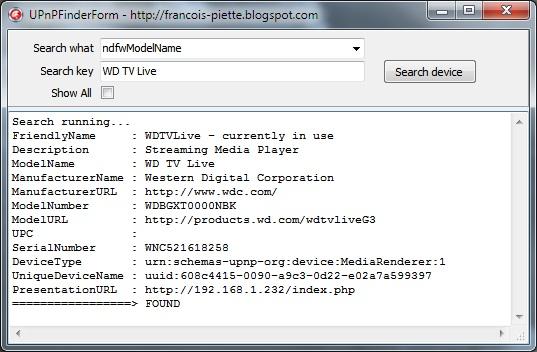
On this screen dump, you see the result of the search for “WD TV Live” on the network. As you can see in the result, this is a Western Digital streaming media player. The search has been done by model name. The combobox allows you to search by all other datas.
Once you have discovered the device, you have at hand a lot of informations. For example, you have the PresentationURL which you can use to manage the device. You get the IP which can be used to access the streaming function.
Another example: Here I searched for “Sagem” in manufacturer name. The result is related to my internet router. You can use the resulting PresentationURL to have the IP address and later use it to open a port for NAT traversal.
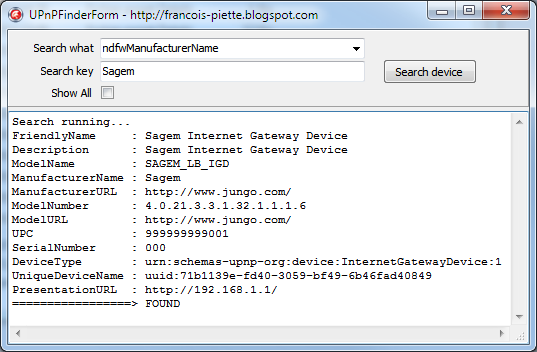
There are countless applications…
All this is very easy using the TNetworkDeviceFinder object Id designed. Here are the stepas:
- Add UPnPFinder unit in the uses clause
- Declare a variable in the protected section:
FNetworkDeviceFinder : INetworkDeviceFinder;
- Initialize the variable, for example in the FormCreate event:
FNetworkDeviceFinder := TNetworkDeviceFinder.Create;
- Assign the event handler which is called when a device is found:
FNetworkDeviceFinder.OnSearchResult := SearchResultHandler;
- Write the handler for the event:
procedure TUPnPFinderDemoForm.SearchResultHandler(
Sender : TObject;
State : TSearchResultState;
var CancelFlag : Boolean);
begin
if State = srsNotFound then
Memo1.Lines.Add(FNetworkDeviceFinder?PresentationURL);
end;
- Start the search, for example from a ButtonClick event:
FNetworkDeviceFinder.StartSearchAsync(ndfwModelName, 'Sagem');
- When you don’t need the feature anymore, for example in the FormDestroy, cancel any pending search and free the interface:
if Assigned(FNetworkDeviceFinder) then begin
FNetworkDeviceFinder.CancelSearchAsync;
FNetworkDeviceFinder := nil;
end;
That’s it! You will find complete source code for the demo and the object at my website: http://www.overbyte.be/frame_index.html?redirTo=/blog_source_code.html
This article is located at:
http://francois-piette.blogspot.be/2013/02/using-universal-plug-and-play-upnp-with.html
If you like this article, please share it!
Follow me on Twitter
January 2, 2013
Why I am using Delphi for all my development
Every now
and then, people keep asking me why I use Delphi to develop my software.
Here are a
few reasons:
1. Speed. Delphi is not only a
language, but also an integrated development environment (IDE). Both parts are
blazing fast at their respective tasks.
Language: Being a native language compiler, the
generated code, Intel machine code, is really fast at doing his job.
IDE: I can do everything within the IDE, from
editing, to debugging. I have tools to quickly build applications. There is a
two way form designer and object inspector. As soon as you change a property
value in the object inspector or move/add something visually on a form, your code
reflects it immediately. Developer productivity is excellent.
2. Universality: Delphi can do almost
everything. There is no need to use anything external. Your program is
standalone and do not depends on anything. If you need it, it is easy to call
external software or be called by external software. Delphi supports almost
everything, from low level API to high level database. You can write business
application as well as process control, communication or multimedia
applications. You can build full blown GUI application 2D or 3D, or build web
applications using soap, rest and more.
3. Modern language: although originally
based on Pascal, the Delphi language is now a full blown object oriented
language supporting everything from simple object polymorphism and inheritance to
generic code and run time type information.
4. Rich library: Delphi includes two broad
component frameworks: VCL and FireMonkey. VCL is Windows only while FireMonkey
is cross-platform.
5. Familiar: C/C++/Java/C# and Delphi
are quite similar. They all have the same kind of syntax. Of course some
details vary, but all in all they support the same construct. Among all, I find
I’m the most productive with Delphi.
6. Cross-platform: You can build
applications for Windows, MAC OSx, iOS, 32 and 64 bits. And soon Androïd and
Linux.
7. Active community: Delphi developer
forms a very active community. There is a lot of website devoted to Delphi. All
social networks have each several communities (LinkedIn, Google+, Facebook, Tweeter to point a few) where ideas and code are exchanged.
Subscribe to:
Posts (Atom)