A pipe is a communication channel between two ends. It is mostly used to communicate between processes running within a computer. As such it is an Inter Process Communication (IPC) mechanism.
The concept of pipe is well known in the Linux (Unix) world. It is used on the command line to direct the output of a command as input of the next command. The so called “pipe character” is used as a syntax gadget for that purpose. Windows is using the same syntax.
More generally, a pipe is an operating system object which is close to a file. An application opens a pipe, then read and writes data and finally closes it. The difference between a pipe and a file is that data is kept in memory and the pipe has two ends. The same or different processes may open the same pipe. What is written at one end becomes readable at the other end. This is why it is named a “pipe”: it fact as a pipe or tunnel between the two ends, data flows from one end and the other. Unlike pipes in the real world, computer pipes are bi-directional. One computer pipe is actually made of two distinct sub-pipes: one for each direction.
We can think of pipes as client/server architecture. The server side opens a pipe and waits for data to be available. The client side opens the pipe and then data may flow into the pipe in both directions independently. If several clients open the same pipe, the server sees it as several independent pipes. At server side, data may be written to individual client’s pipes or broadcasted to all clients.
As seen from Windows API, a pipe can be created with or without a name. Giving a name to a pipe allows processes to share the same pipe easily. When using anonymous pipes, a process knows about it because it has inherited his handle.
The process that creates a pipe is the pipe server. A process that connects to a pipe is a pipe client. One process writes data to the pipe, and then the other process reads the data from the pipe. This is bidirectional: each process can write data that will be read by the other. Read and writes are asynchronous. It means a lot of data may be written before it is read at the other end. Data is stored by the operating system into shared memory. The size of the shared memory area is managed by the operating system using advisory values passed to the pipe’s creation function.
Windows pipe API is relatively complex. It has been encapsulated into Delphi classes by Russell Libby in 2003. Although Russell website is no more available, his code is still around in the internet and has been enhanced by several peoples. I have updated his code for Delphi XE3 and made it available from my website at http://www.overbyte.be/eng/blog_source_code.html
Russell wrote a unit named “pipes.pas” containing 3 components:
- TPipeClient: client component
- TPipeServer: Server component
- TPipConsole: console pipe redirection component
For your convenience, I created two packages: one runtime package and one design time package. The components are installed in the component palette under “Pipes” tab.
Using the components is fairly simple. I made two simple demo programs: PipeClient and PipeServer. You run PipeServer first and then one or more PipeClient instances. PipeClient has an edit box and a “Send” button. When you click on “Send”, the edit box content is sent to the server which in turn displays it in a memo. At server side, the “send” button is replaced by “broadcast” to send the same message to all connected client, if any. Of course you may also send to a specific client.
To send the messages, I actually send strings, taking care of Unicode. When sending (Write or broadcast method), you have to pass a pointer to the first byte to be sent and a count of bytes. At receiver side, data is read from a stream which is also made of bytes.
Warning: a pipe is a byte oriented communication channel. There is no guarantee that each single write at one end will correspond to a single read at the other end. Sending strings has I’ve done in my demo is good for interactive application where a user clicks on a button. In a real world application, you have to design a protocol, just like you do when using socket, so that the reader knows exactly what the writer sent. For example, you send a message made of a byte count and the then actual bytes. Or you design a “line oriented” protocol much like most TCP/IP protocol are. Your messages are made you line of text terminated by a CRLF pair. The reader knows he received a complete message because he received the CRLF pair.
To say it in other words, a pipe is like a TFileStream. The read doesn’t know how the stream has been written. He knows how to read it, for example he knows the stream is made of text lines.
UPDATE 2013-10-04: arno.garrels@gmx.de added 64-bit support and fixed code to compile with Delphi 7 to XE5 (earlier versions may compile however untested).
Follow me on Twitter
Follow me on LinkedIn
Follow me on Google+
Visit my website: http://www.overbyte.be
This article is available from http://francois-piette.blogspot.be
Download source code from my website at
http://www.overbyte.be/eng/blog_source_code.html

April 3, 2013


March 17, 2013
Multithreading and PostMessage performance
Windows messaging system is very useful for doing asynchronous programming, including multithreading. But what about performance?
In asynchronous operation, including multithreading, a developer frequently needs a message queue to serialize processing and notifications. Windows has his own message queue which is mostly used for the user interface but also for many asynchronous tasks such as sockets notifications. In multithreading programming Windows own messaging system is very handy because it solve a big issue: synchronizing threads.
When a thread post a message to another thread message queue, that message will be processed in the context of the thread which owns the message queue. This is also true when the message is sent instead of posted.
What is the difference between PostMessage and SendMessage? Easy question: PostMessage add a message at the end of the recipient queue and returns immediately. SendMessage do the same, but wait until the message is processed, switching thread context if required.
Ok, now what about performance? To evaluate it, I wrote a small test program. It makes use of a so called “worker thread” to process messages. The main thread will send message to the worker thread message queue and measure how long it takes. The worker thread will remove and process the messages from the queue and also measure how long it takes.
On my system which is a HP Z600 Workstation running Windows 64 bits, on average, it takes:
- - 32 bit: 0.7 micro second to post a message and 0.9 micro second to retrieve one message.
- - 64 bit: 0.6 micro second to post a message and 0.7 micro second to retrieve one message.
I wrote “on average” because the time varies a lot depending on the system activity. The test program post 5000 messages as fast as possible while the worker thread is blocked and then the worker thread retrieve the messages. A high resolution timer is used to measure the times.
About the demo code
My demo code is interesting beyond the subject of this article. I build a reusable worker thread class having a message queue and a message loop. Then in the main program I derived a new thread class from the worker thread class and added to code specific to this application.
The worker thread class (TMsgHandlingWorkerThread) has an Execute procedure which creates the message queue, call a message loop and then destroy the message queue before terminating.
This behavior is exactly the behavior of any GUI application. Delphi runtime does all the work required in his forms unit that is why you never see it.
Creating a message queue is basic Windows programming. It has been the same since almost the beginning. It is a matter of a few native API calls and involves creating a hidden window so that the message queue has a handle.
Windows native API is not object oriented. So I have added some data to bridge between Windows API and Delphi object model. I simply added a pointer to the class owning the message queue (Our worker thread) to the data Windows is storing along with each window. Later, when Windows calls the procedure to handle the messages, that pointer is retrieved and used to call the object’s WndProc.
This probably sound complicated if this is the first time you see that kind of code. You’ll find tons of articles explaining this basic Windows programming. This reminds me a very old and excellent book by Charles Petzold: “Programming Windows 3.1” published back in 1992. He reviewed his books several times since then. Almost everything in that book is still applicable for 32 and 64 bit Windows!
Windows events
One other interesting point in the demo code is the use of Windows “event” object. Do not confuse this with the events you use every day with Delphi. Beside the names, they have not much in common.
A Windows event is an operating system synchronization object. An event has two states: signaled and nonsignaled. One can programmatically set it in the signaled state or wait until it is in signaled state.
Here in my code I use two Windows events. One to block the worker thread while the main thread fills the message queue with thousands of messages and another one the main thread wait for his signaled state while the worker thread is processing the messages.
The events are created unnamed and in the nonsignaled state. WaitForSingleObject API function is used to block until the event goes in signaled state. A thread which has called WaitForSingleObject is put to sleep until the event becomes signaled. By the way, if several threads are waiting for the same event, one and only one is unblocked when the event is signaled.
Critical section
Another Windows operating system synchronization object is used by my worker thread class. It is a critical section. A critical section is an object that can be “entered” or “leaved” by a thread. Only one thread can enter the critical section. No other can enter it until the first one has leaved. Trying to enter a critical section already entered put the thread in a wait state until the critical section is leaved.
My use of the critical section is to make sure only one thread is able to register or unregister the window class used to create the hidden window. It is also used to make sure the handle is accessed only before or after it has been created but not in the middle of his creation.
Thread naming
There is an API “NameThreadForDebugging” to give each thread a name. Actually this doesn’t really give the name to the thread but associates a name with a thread for the debugger. If there is no debugger, it just does nothing. When you use this thread naming, you can see it in action with Delphi debugger. One on a breakpoint, show the thread windows (Ctrl + Alt + T within the IDE) and see the thread name appearing in the thread list. Very handy for understanding what’s happen whith your threads.
Source code (Main application)
Download source from http://www.overbyte.be/frame_index.html?redirTo=/blog_source_code.html
{* * * * * * * * * * * * * * * * * * * * * * * * * * * * * * * * * * * * * *

Author:       François PIETTE @ www.overbyte.be
Creation:     March 17, 2013
Description:  Demo code for worker thread having a message pump.
Version:      1.00
History:


 * * * * * * * * * * * * * * * * * * * * * * * * * * * * * * * * * * * * * *}
program Project1;

{$APPTYPE CONSOLE}

{$R *.res}

uses
  Windows,
  Messages,
  Classes,
  SysUtils,
  MsgHandlingWorkerThread in 'MsgHandlingWorkerThread.pas';

const
    WM_POST_START = WM_USER + 1;
    WM_POST_MSG   = WM_USER + 2;
    WM_POST_STOP  = WM_USER + 3;

type
    TMyWorkerThread = class(TMsgHandlingWorkerThread)
    protected
        Tick1    : Int64;
        Tick2    : Int64;
        Freq     : Int64;
        procedure WndProc(var MsgRec: TMessage); override;
        procedure WMPostStart(var MsgRec: TMessage);
        procedure WMPostMsg(var MsgRec: TMessage);
        procedure WMPostStop(var MsgRec: TMessage);
    end;

var
    WThread : TMyWorkerThread;
    WHandle : THandle;


{* * * * * * * * * * * * * * * * * * * * * * * * * * * * * * * * * * * * * *}

{ TMyWorkerThread }

{* * * * * * * * * * * * * * * * * * * * * * * * * * * * * * * * * * * * * *}
procedure TMyWorkerThread.WMPostMsg(var MsgRec: TMessage);
begin
    // On the first message, we record the high resolution timer tick
    // Message number is passed into WParam
    if MsgRec.WParam = 1 then
        QueryPerformanceCounter(Tick1);
end;


{* * * * * * * * * * * * * * * * * * * * * * * * * * * * * * * * * * * * * *}
procedure TMyWorkerThread.WMPostStop(var MsgRec: TMessage);
var
    MicroSec : String;
    N        : Integer;
    Event2   : THandle;
begin
    // This message signal the end of posted message, record ending tick
    // from the high resolution timer
    QueryPerformanceCounter(Tick2);
    QueryPerformanceFrequency(Freq);
    // Now compute the time per message. The number of messages has been
    // passed to into WParam
    N        := MsgRec.WParam;
    MicroSec := Format('%6.2f', [1E6 * (Tick2 - Tick1) / Freq / N]);
    WriteLn('Retrieving ' + IntToStr(N) + ' messages took ' +
            MicroSec + ' microsecond per message');
    Event2 := THandle(MsgRec.LParam);
    SetEvent(Event2);
end;


{* * * * * * * * * * * * * * * * * * * * * * * * * * * * * * * * * * * * * *}
procedure TMyWorkerThread.WMPostStart(var MsgRec: TMessage);
var
    Event1 : THandle;
begin
    Event1 := THandle(MsgRec.WParam);
    WaitForSingleObject(Event1, INFINITE);
end;


{* * * * * * * * * * * * * * * * * * * * * * * * * * * * * * * * * * * * * *}
procedure TMyWorkerThread.WndProc(var MsgRec: TMessage);
begin
    case MsgRec.Msg of
    WM_POST_START: WMPostStart(MsgRec);
    WM_POST_MSG:   WMPostMsg(MsgRec);
    WM_POST_STOP:  WMPostStop(MsgRec);
    else
        inherited WndProc(MsgRec);
    end;
end;


{* * * * * * * * * * * * * * * * * * * * * * * * * * * * * * * * * * * * * *}

{ Main program }

{* * * * * * * * * * * * * * * * * * * * * * * * * * * * * * * * * * * * * *}
procedure MainThread;
var
    Event1   : THandle;
    Event2   : THandle;
    I        : Integer;
    Tick1    : Int64;
    Tick2    : Int64;
    Freq     : Int64;
    MicroSec : String;
    N        : Integer;
begin
    // We create an event that will be used by the worker thread to be blocked
    // while we post a ton of messages
    Event1 := CreateEvent(nil, TRUE, FALSE, nil);
    Event2 := CreateEvent(nil, TRUE, FALSE, nil);
    // PotMessage to the worker thread to give it the event. On receipt, the
    // worker thread will start waiting.
    PostMessage(WHandle, WM_POST_START, WParam(Event1), 0);
    // Let some time for the worker thread to get the message and be blocked
    Sleep(100);

    QueryPerformanceCounter(Tick1);
    // There is a window limit to 10000 unprocessed message per queue
    N := 5000;
    for I := 1 to N do begin
        if not PostMessage(WHandle, WM_POST_MSG, WParam(I), 0) then begin
            WriteLn('PostMessage failed at ' + IntToStr(I));
            break;
        end;
    end;
    QueryPerformanceCounter(Tick2);
    QueryPerformanceFrequency(Freq);
    MicroSec := Format('%6.2f', [1E6 * (Tick2 - Tick1) / Freq / N]);
    WriteLn('Posting ' + IntToStr(N) + ' messages took ' +
            MicroSec + ' microsecond per message');

    // Now post one more message which will be used to terminate the time
    // computation
    PostMessage(WHandle, WM_POST_STOP, WParam(N), LParam(Event2));

    // Now release the worker thread so that it starts processing the messages
    SetEvent(Event1);

    // Now wait on Event2 which will be signaled by the thread when he finished
    // retrieving all messages.
    WaitForSingleObject(Event2, INFINITE);
end;


{* * * * * * * * * * * * * * * * * * * * * * * * * * * * * * * * * * * * * *}
begin
    IsMultiThread := TRUE;
    try
        WThread := TMyWorkerThread.Create(TRUE);
        WThread.Start;
        // Spin while waiting for handle to be created. ToDo: timeout!
        while WThread.Handle = INVALID_HANDLE_VALUE do
            Sleep(0);

        WHandle := WThread.Handle;
        if WHandle = 0 then
            WriteLn('Failed to create hidden window')
        else begin
            try
                MainThread;
            finally
                PostMessage(WHandle, WM_QUIT, 0, 0);
            end;
        end;
        WThread.WaitFor;
        WThread.Free;
        WriteLn('Hit enter to quit...');
        ReadLn;
    except
        on E: Exception do
            Writeln(E.ClassName, ': ', E.Message);
    end;
end.
Source code (Worker thread)
{* * * * * * * * * * * * * * * * * * * * * * * * * * * * * * * * * * * * * *

Author:       François PIETTE @ www.overbyte.be
Creation:     March 17, 2013
Description:  Worker thread having a message pump, working mostly like
              the main thread. Intended to be the base class for your own
              worker threads: all methods are virtual.
Version:      1.00
History:


 * * * * * * * * * * * * * * * * * * * * * * * * * * * * * * * * * * * * * *}
unit MsgHandlingWorkerThread;

interface

uses
    Windows, Messages, Classes, SysUtils;

type
    TMsgHandlingWorkerThread = class(TThread)
    protected
        FHandle        : HWND;
        procedure AllocateHWnd; virtual;
        procedure DeallocateHWnd; virtual;
        procedure MessageLoop; virtual;
        function  GetHandle: HWND; virtual;
    public
        constructor Create(Suspended : Boolean); virtual;
        procedure Execute; override;
        procedure WndProc(var MsgRec: TMessage); virtual;
        property Handle : HWND read GetHandle;
    end;


implementation

var
    GWndHandleCount     : Integer;
    GWndHandlerCritSect : TRTLCriticalSection;

const
    WinThreadWindowClassName = 'WinThreadWindowClass';

{* * * * * * * * * * * * * * * * * * * * * * * * * * * * * * * * * * * * * *}
// Forward declaration for our Windows callback function
function WndControlWindowsProc(
    ahWnd   : HWND;
    auMsg   : UINT;
    awParam : WPARAM;
    alParam : LPARAM): LRESULT; stdcall; forward;


{* * * * * * * * * * * * * * * * * * * * * * * * * * * * * * * * * * * * * *}
procedure TMsgHandlingWorkerThread.AllocateHWnd;
var
    TempClass                : TWndClass;
    WinThreadWindowClass : TWndClass;
    ClassRegistered          : Boolean;
begin
    // Nothing to do if hidden window is already created
    if FHandle <> INVALID_HANDLE_VALUE then
        Exit;

    // We use a critical section to be sure only one thread can check if a
    // class is registered and register it if needed.
    // We must also be sure that the class is not unregistered by another
    // thread which just destroyed a previous window.
    EnterCriticalSection(GWndHandlerCritSect);
    try
        // Check if the window class is already registered
        WinThreadWindowClass.hInstance     := HInstance;
        WinThreadWindowClass.lpszClassName := WinThreadWindowClassName;
        ClassRegistered := GetClassInfo(HInstance,
                                        WinThreadWindowClass.lpszClassName,
                                        TempClass);
        if not ClassRegistered then begin
            // Not registered yet, do it right now !
            WinThreadWindowClass.style         := 0;
            WinThreadWindowClass.lpfnWndProc   := @WndControlWindowsProc;
            WinThreadWindowClass.cbClsExtra    := 0;
            WinThreadWindowClass.cbWndExtra    := SizeOf(Pointer);
            WinThreadWindowClass.hIcon         := 0;
            WinThreadWindowClass.hCursor       := 0;
            WinThreadWindowClass.hbrBackground := 0;
            WinThreadWindowClass.lpszMenuName  := nil;

           if Windows.RegisterClass(WinThreadWindowClass) = 0 then
                raise Exception.Create(
                     'Unable to register hidden window class.' +
                     ' Error #' + IntToStr(GetLastError) + '.');
        end;

        // Now we are sure the class is registered, we can create a window using it
        FHandle := CreateWindowEx(WS_EX_TOOLWINDOW,
                                  WinThreadWindowClass.lpszClassName,
                                  '',        // Window name
                                  WS_POPUP,  // Window Style
                                  0, 0,      // X, Y
                                  0, 0,      // Width, Height
                                  0,         // hWndParent
                                  0,         // hMenu
                                  HInstance, // hInstance
                                  nil);      // CreateParam

        if FHandle = 0 then
            raise Exception.Create(
                'Unable to create hidden window. ' +
                ' Error #' + IntToStr(GetLastError) + '.');

        // We have a window. In the associated data, we record a reference
        // to our object. This will later allow to call the WndProc method to
        // handle messages sent to the window.
    {$IFDEF WIN64}
        SetWindowLongPtr(FHandle, 0, INT_PTR(Self));
    {$ELSE}
        SetWindowLong(FHandle, 0, Longint(Self));
    {$ENDIF}
        Inc(GWndHandleCount);
    finally
        LeaveCriticalSection(GWndHandlerCritSect);
    end;
end;


{* * * * * * * * * * * * * * * * * * * * * * * * * * * * * * * * * * * * * *}
constructor TMsgHandlingWorkerThread.Create(Suspended: Boolean);
begin
    FHandle := INVALID_HANDLE_VALUE;
    inherited Create(Suspended);
end;


{* * * * * * * * * * * * * * * * * * * * * * * * * * * * * * * * * * * * * *}
procedure TMsgHandlingWorkerThread.DeallocateHWnd;
begin
    // No handle, nothing to do
    if FHandle = INVALID_HANDLE_VALUE then
        Exit;

{$IFDEF WIN64}
    SetWindowLongPtr(FHandle, 0, 0); // Delete object reference
{$ELSE}
    SetWindowLong(FHandle, 0, 0);    // Delete object reference
{$ENDIF}
    DestroyWindow(FHandle);          // Destroy hidden window
    FHandle := INVALID_HANDLE_VALUE; // No more handle

    EnterCriticalSection(GWndHandlerCritSect);
    try
        Dec(GWndHandleCount);
        if GWndHandleCount <= 0 then
            // Unregister the window class use by the component.
            // This is necessary to do so from a DLL when the DLL is unloaded
            // (that is when DllEntryPoint is called with dwReason equal to
            // DLL_PROCESS_DETACH.
            Windows.UnregisterClass(WinThreadWindowClassName, HInstance);
    finally
        LeaveCriticalSection(GWndHandlerCritSect);
    end;
end;


{* * * * * * * * * * * * * * * * * * * * * * * * * * * * * * * * * * * * * *}
procedure TMsgHandlingWorkerThread.Execute;
begin
    NameThreadForDebugging(ClassName);
    AllocateHWnd;
    try
        MessageLoop;
    finally
        DeallocateHWnd
    end;
end;


{* * * * * * * * * * * * * * * * * * * * * * * * * * * * * * * * * * * * * *}
function TMsgHandlingWorkerThread.GetHandle: HWND;
begin
    EnterCriticalSection(GWndHandlerCritSect);
    try
        Result := FHandle;
    finally
        LeaveCriticalSection(GWndHandlerCritSect);
    end;
end;


{* * * * * * * * * * * * * * * * * * * * * * * * * * * * * * * * * * * * * *}
// Loop thru message processing until the WM_QUIT message is received
// The loop is broken when WM_QUIT is retrieved.
procedure TMsgHandlingWorkerThread.MessageLoop;
var
    MsgRec : TMsg;
begin
    // If GetMessage retrieves the WM_QUIT, the return value is FALSE and
    // the message loop is broken.
    while GetMessage(MsgRec, 0, 0, 0) do begin
        TranslateMessage(MsgRec);
        DispatchMessage(MsgRec)
    end;
    Terminate;
end;


{* * * * * * * * * * * * * * * * * * * * * * * * * * * * * * * * * * * * * *}
procedure TMsgHandlingWorkerThread.WndProc(var MsgRec: TMessage);
begin
    MsgRec.Result := DefWindowProc(Handle, MsgRec.Msg,
                                   MsgRec.wParam, MsgRec.lParam);
end;


{* * * * * * * * * * * * * * * * * * * * * * * * * * * * * * * * * * * * * *}
// WndControlWindowsProc is a callback function used for message handling
function WndControlWindowsProc(
    ahWnd   : HWND;
    auMsg   : UINT;
    awParam : WPARAM;
    alParam : LPARAM): LRESULT; {$IFNDEF CLR} stdcall; {$ENDIF}
var
    Obj    : TObject;
    MsgRec : TMessage;
begin
    // When the window is created, we receive the following messages:
    // #129 WM_NCCREATE
    // #131 WM_NCCALCSIZE
    // #1   WM_CREATE
    // #5   WM_SIZE
    // #3   WM_MOVE
    // Later we receive:
    // #28  WM_ACTIVATEAPP
    // When the window is destroyed we receive
    // #2   WM_DESTROY
    // #130 WM_NCDESTROY

    // When the window was created, we stored a reference to the object
    // into the storage space we asked windows to have
{$IFDEF WIN64}
    Obj := TObject(GetWindowLongPtr(ahWnd, 0));
{$ELSE}
    Obj := TObject(GetWindowLong(ahWnd, 0));
{$ENDIF}
    // Check if the reference is actually our object type
    if not (Obj is TMsgHandlingWorkerThread) then
        Result := DefWindowProc(ahWnd, auMsg, awParam, alParam)
    else begin
        // Internally, Delphi use TMessage to pass parameters to his
        // message handlers.
        MsgRec.Msg    := auMsg;
        MsgRec.wParam := awParam;
        MsgRec.lParam := alParam;
        TMsgHandlingWorkerThread(Obj).WndProc(MsgRec);
        Result := MsgRec.Result;
    end;
end;


{* * * * * * * * * * * * * * * * * * * * * * * * * * * * * * * * * * * * * *}

initialization
    InitializeCriticalSection(GWndHandlerCritSect);

finalization
    DeleteCriticalSection(GWndHandlerCritSect);

end.
Follow me on Twitter
Follow me on LinkedIn
Follow me on Google+
Visit my website: http://www.overbyte.be
This article is available from http://francois-piette.blogspot.be/2013/03/multithreading-and-postmessage-performance.html
Download source from http://www.overbyte.be/frame_index.html?redirTo=/blog_source_code.html
March 5, 2013
Memory leaks detection
The subject of memory leaks detection is frequently invoked and yet, lots of people still wonder how to do it! There are a lot of tools on the market for that purpose. I will talk about the two that I am using:
Using FastMM is very easy. There is no install, just copy the files somewhere on your hard disk. You have to add FastMM4 unit as the first unit under the "uses" section in your project's dpr file. Then you recompile the application.
To take fully advantage of FastMM feature, you should open FastMM4Options.inc file and change some conditional compilation directive. This file is heavily commented to explain all the symbols. When developing your application, you should define the symbols "EnableMemoryLeakReporting" and "FullDebugMode".
Defining FullDebugMode symbol cause code doing extensive checking of all memory blocks to be included in the application. All blocks are padded with both a header and trailer that are used to verify the integrity of the heap. Freed blocks are also cleared to ensure that they cannot be reused after being freed. This option slows down memory operations dramatically and should only be used to debug an application that is overwriting memory or reusing freed pointers. Setting this option automatically enables CheckHeapForCorruption and disables ASMVersion. Very important: If you enable this option your application will require the FastMM_FullDebugMode.dll library.
madExcept is one of the tools in madCollection. It is worth looking for all.
madExcept is free for non-commercial use and not expensive at all for commercial use. Source code is available. See madshi website: http://www.madshi.net/
To use madExcept, you have to install it because it include a "wizard" which is show in the IDE project menu. This wizard will configure the tool and add the required units to your project. The first page of the wizard has most interesting options, notably the one to select for reporting the leaks (memory or other resources).
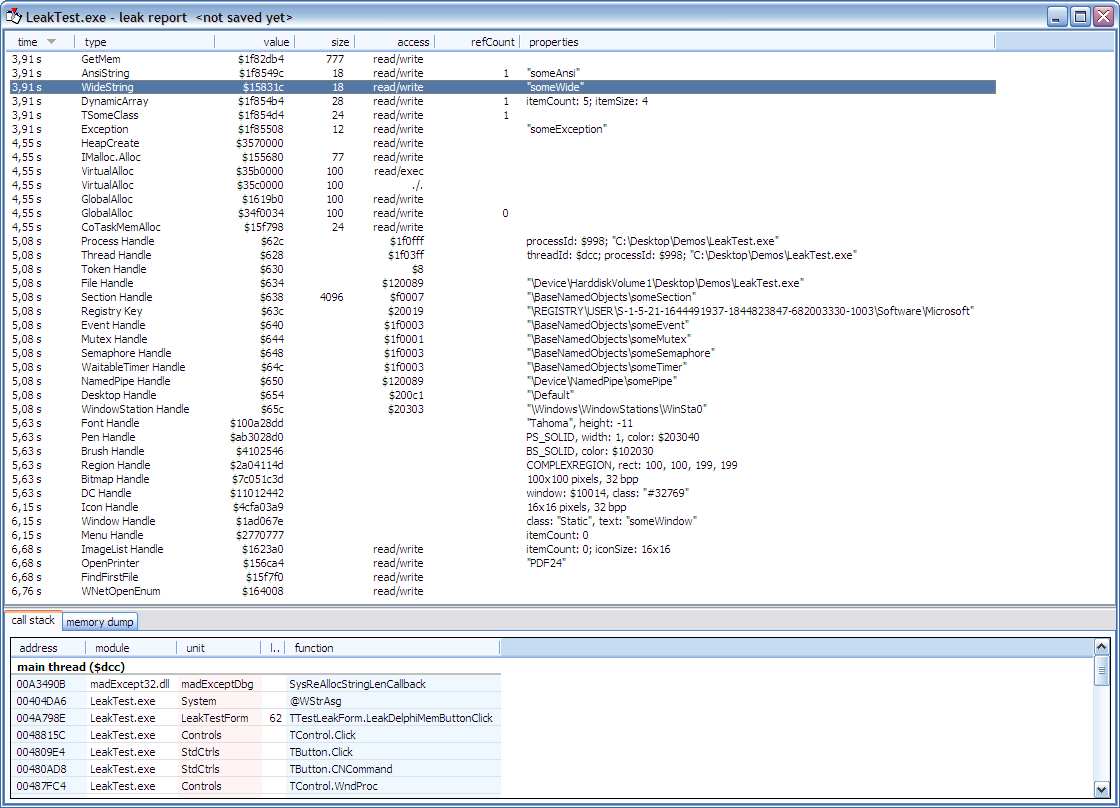
At the end of program execution, you get a report with all links and required information to find the context in which the leak occurred. See this screen dump:

Follow me on Twitter
Follow me on LinkedIn
Follow me on Google+
Visit my website: http://www.overbyte.be
This article is available from http://francois-piette.blogspot.be/2013/03/memory-leaks-detection.html
- FastMM
- madExcept
FastMM
FastMM is actually the memory manager included with Delphi since a few years. It is an original work of Pierre le Riche. Although included with Delphi, you can download full source code from SourceForge at http://fastmm.sourceforge.netUsing FastMM is very easy. There is no install, just copy the files somewhere on your hard disk. You have to add FastMM4 unit as the first unit under the "uses" section in your project's dpr file. Then you recompile the application.
To take fully advantage of FastMM feature, you should open FastMM4Options.inc file and change some conditional compilation directive. This file is heavily commented to explain all the symbols. When developing your application, you should define the symbols "EnableMemoryLeakReporting" and "FullDebugMode".
Defining FullDebugMode symbol cause code doing extensive checking of all memory blocks to be included in the application. All blocks are padded with both a header and trailer that are used to verify the integrity of the heap. Freed blocks are also cleared to ensure that they cannot be reused after being freed. This option slows down memory operations dramatically and should only be used to debug an application that is overwriting memory or reusing freed pointers. Setting this option automatically enables CheckHeapForCorruption and disables ASMVersion. Very important: If you enable this option your application will require the FastMM_FullDebugMode.dll library.
madExcept
madExcept is a tool created by Mathias Rauen. It is an incredibly useful tool, not only for memory leaks, but to help finding the cause of all kind of exceptions.madExcept is one of the tools in madCollection. It is worth looking for all.
madExcept is free for non-commercial use and not expensive at all for commercial use. Source code is available. See madshi website: http://www.madshi.net/
To use madExcept, you have to install it because it include a "wizard" which is show in the IDE project menu. This wizard will configure the tool and add the required units to your project. The first page of the wizard has most interesting options, notably the one to select for reporting the leaks (memory or other resources).
At the end of program execution, you get a report with all links and required information to find the context in which the leak occurred. See this screen dump:
Follow me on Twitter
Follow me on LinkedIn
Follow me on Google+
Visit my website: http://www.overbyte.be
This article is available from http://francois-piette.blogspot.be/2013/03/memory-leaks-detection.html
Subscribe to:
Posts (Atom)