Showing posts with label Device Discovery. Show all posts

April 29, 2013

Delphi XE4 and AnsiString

I already ported a lot of my applications to Delphi XE4. This represent hundreds of thousands lines of code. All in all this was very easy, coming from XE3.

There is only one changed feature that forced me to slightly update my source code: in XE4, all AnsiString routines have been moved to a new unit named System.AnsiStrings. I had to add this unit where ever I used on of those routines. If you don't, XE4 gives a warning about deprecated function:

Given the code:

procedure TForm1.Button1Click(Sender: TObject);
var
    S : AnsiString;
    L : Integer;
begin
    S := 'Hello world!';
    L := StrLen(PAnsiChar(S));
end;

You get the warning:
    [dcc32 Warning] Unit1.pas(32): W1000 Symbol 'StrLen' is deprecated: 
 'Moved to the AnsiStrings unit'

Sadly, if you add System.AnsiStrings to the uses clause and recompile the code, you get the warning:
[dcc32 Error] Unit1.pas(33): E2251 Ambiguous overloaded call to 'StrLen'
  System.SysUtils.pas(10369): Related method: 
       function StrLen(const PAnsiChar): Cardinal;
  System.AnsiStrings.pas(3166): Related method: 
       function StrLen(const PAnsiChar): Cardinal;

I don’t clearly understand why the compiler emit this warning because as you see, the two overloaded versions of StrLen are the same!

To avoid this issue, you have to fully qualify StrLen like this:
procedure TForm1.Button1Click(Sender: TObject);
var
    S : AnsiString;
    L : Integer;
begin
    S := 'Hello world!';
    L := System.AnsiStrings.StrLen(PAnsiChar(S));
end;
Unfortunately, this makes the code not compilable anymore with previous Delphi versions. XE3 has an AnsiStrings unit but without StrLen.

I have to produce code working for several Delphi versions. So I designed a little workaround so that change in my existing source code is mimimal. I wrote a new _StrLen function which has the required conditional compilation to make it works with all Delphi versions. And everywhere I call StrLen, I replaced it by _StrLen. This is easy to find since the compiler complain at each instance.
function _StrLen(const S : PAnsiChar): Cardinal;
begin
{$IFDEF VER250}
    Result := System.AnsiStrings.StrLen(S);
{$ELSE}
    Result := StrLen(S);
{$ENDIF}
end;
In the uses clause, I have this:
uses
  Windows, Messages,
{$IFDEF VER250}
  System.AnsiStrings,
{$ENDIF}
  SysUtils, Variants, Classes, Graphics,  Controls, Forms, Dialogs, StdCtrls;
Please note that in order to say compatible with very old Delphi versions such as Delphi 7, I don’t use prefixes and instead I use the “unit scope name” in the project options so that the compiler properly resolve “SysUtils” to “System.SysUtils” and the likes for compilers which supports unit scope naming. Anyway, almost all my source code was already written that way because most of it exists long before Delphi supported that feature.

What I explained here about StrLen occurs with many other ANSI strings routines. Same solution applies to all.

This article is available from:
  http://francois-piette.blogspot.be/2013/04/delphi-xe4-and-ansistring.html

Follow me on Twitter
Follow me on LinkedIn
Follow me on Google+
Visit my website: http://www.overbyte.be

February 10, 2013

Using Universal Plug And Play (UPnP) with Delphi


UPnP is a set of networking protocols that allows discovery of networked devices supporting UPnP. For example, you can easily discover printers, Wi-Fi access points, internet gateways, Streaming servers and many other types of devices.

Microsoft Windows provides an API to use UPnP. This API is located in a DLL which basically exposes a COM interface. You’ll find the documentation on Microsoft MSDN website http://msdn.microsoft.com/en-us/library/windows/desktop/aa382303(v=vs.85).aspx.

UPnP API is not complex to use but, of course, is not written the “Delphi way”. This is why I wrote a Delphi layer above the API to ease its use.

I created an object TNetworkDeviceFinder which implement the call back functions that Microsoft API requires to discover UPnP devices connected on the network and expose the result as a set of properties and a single event.

To get an abstraction level, I had the choice to write a component or an interface. I selected to implement it as an interface. Basically you may use my TNetworkDeviceFinder object as a simple Delphi object or as an interface. The later is easier.

I wrote a complete demo application available from my website at http://www.overbyte.be/eng/blog_source_code.html. You can download full source code so I will only show here some significant portions. The demo application is interesting not only for his UPnP usage, but also as a model for a real application. It has those features:
  • Search for a UPnP device on the network using many criteria
  • List all UPnP devices on the network
  • Have his data persistent
  • Have if form position and size persistent
  • Store the INI file in Local/AppData folder (Win7 friendly)

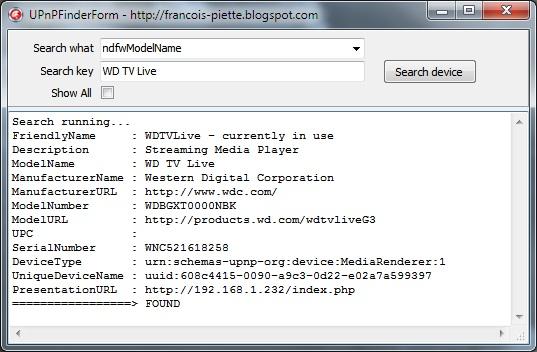
The demo application in action looks like this:


On this screen dump, you see the result of the search for “WD TV Live” on the network. As you can see in the result, this is a Western Digital streaming media player. The search has been done by model name. The combobox allows you to search by all other datas.

Once you have discovered the device, you have at hand a lot of informations. For example, you have the PresentationURL which you can use to manage the device. You get the IP which can be used to access the streaming function.

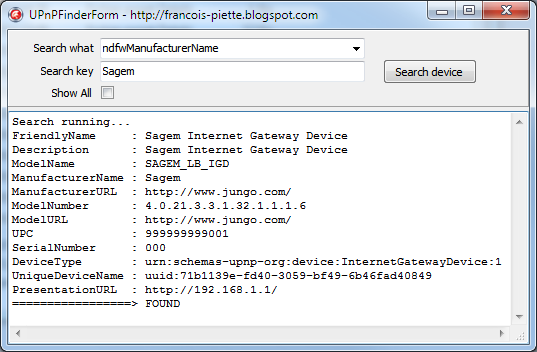
Another example: Here I searched for “Sagem” in manufacturer name. The result is related to my internet router. You can use the resulting PresentationURL to have the IP address and later use it to open a port for NAT traversal.


There are countless applications…

All this is very easy using the TNetworkDeviceFinder object Id designed. Here are the stepas:

  1. Add UPnPFinder unit in the uses clause
  2. Declare a variable in the protected section:
FNetworkDeviceFinder : INetworkDeviceFinder;


  1. Initialize the variable, for example in the FormCreate event:
FNetworkDeviceFinder := TNetworkDeviceFinder.Create;


  1. Assign the event handler which is called when a device is found:
FNetworkDeviceFinder.OnSearchResult := SearchResultHandler;


  1. Write the handler for the event:
procedure TUPnPFinderDemoForm.SearchResultHandler(
Sender : TObject;
State : TSearchResultState;
var CancelFlag : Boolean);
begin
if State = srsNotFound then
Memo1.Lines.Add(FNetworkDeviceFinder?PresentationURL);
end;


  1. Start the search, for example from a ButtonClick event:
FNetworkDeviceFinder.StartSearchAsync(ndfwModelName, 'Sagem');


  1. When you don’t need the feature anymore, for example in the FormDestroy, cancel any pending search and free the interface:
if Assigned(FNetworkDeviceFinder) then begin
FNetworkDeviceFinder.CancelSearchAsync;
FNetworkDeviceFinder := nil;
end;

That’s it! You will find complete source code for the demo and the object at my website: http://www.overbyte.be/frame_index.html?redirTo=/blog_source_code.html
This article is located at:
http://francois-piette.blogspot.be/2013/02/using-universal-plug-and-play-upnp-with.html

If you like this article, please share it!
Follow me on Twitter